DUAL SERVO: INTERACTIVE SHOW KIT
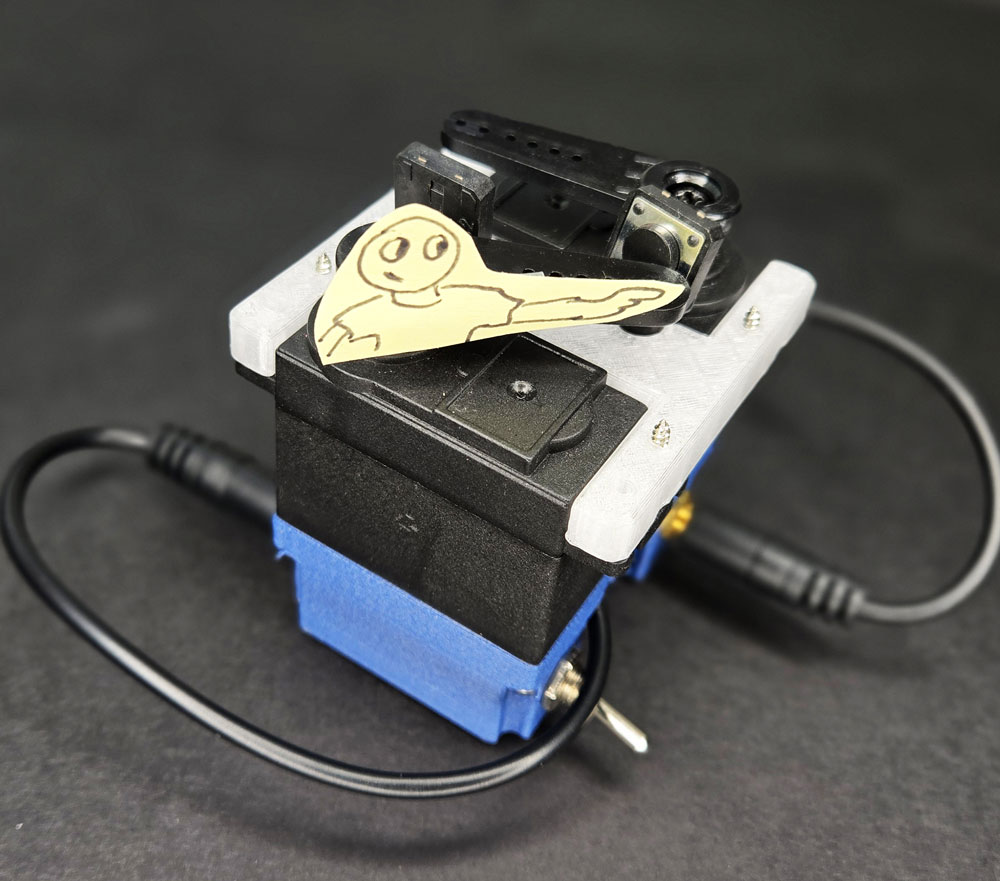
LESSON SNAPSHOT
| Kit | Dual Servo: Interactive Show Kit - Student Guide #9 |
|---|---|
| Client | Emma Rodriguez, Age 9 - Needs engaging visual stimulation during quiet periods that doesn't require constant participation |
| Core Concept | Coordinated multi-device systems and lifelike motion through behavioral programming |
| Prerequisites | Getting Started with Smart Servo (Guide #1); familiarity with basic CircuitPython and servo control |
| Student Guide | tinyurl.com/SS-STL-DUAL |
⚠️ Safety Considerations
Dual power management: Students working with two servos simultaneously should verify both power connections before testing to prevent unexpected behavior from one servo affecting the other.
What This Kit Teaches
Engineering/Design Focus: This kit introduces coordinated multi-device control and behavioral programming concepts. Students move beyond controlling a single servo to creating systems where two servos interact through their environment, triggering each other through physical button presses. The project explores how simple mechanical actions combined with varied timing patterns can create the appearance of personality and intention in motion.
Human-Centered Design Connection: Emma needs something that provides sensory engagement without demanding constant active participation. The dual servo system creates unpredictable, lifelike movements that hold visual attention while allowing her to engage or disengage as needed during quiet periods at home.
Standards at a Glance: Primary domains are HCD, CSTA, NGSS, STEL - See appendix for complete alignment
ESSENTIAL TEACHING MOMENTS
Key concepts worth pausing to discuss during the lesson
Moment 1: Physical Interaction Between Devices
Student Guide Reference: Steps 3-7 (mounting both servos and buttons)
Core Idea: Two separate computing devices can interact through physical actions in their shared environment rather than direct electronic communication.
Why It Matters: This demonstrates an important systems design principle - devices don't always need to "talk" to each other digitally; they can coordinate through the physical world, creating simpler, more robust systems.
Discussion Prompts to Consider:
- "How is this different from the way your phone and wireless headphones communicate?"
- "What are the advantages of having servos trigger each other physically instead of through code connections?"
- "Can you think of other systems where separate devices coordinate through physical actions?"
Watch For: Students may initially assume they need to connect the servos electronically or through code. Emphasize that each servo operates completely independently - they only "know" about each other through button presses.
Moment 2: From Mechanical to Lifelike
Student Guide Reference: Steps 9-10 (creating patterns and adding variability)
Core Idea: Predictable mechanical motion becomes lifelike when we add randomness, timing variations, and behavioral patterns that mimic how living things move.
Why It Matters: Understanding how perceived personality emerges from motion patterns is fundamental to robotics, animation, game design, and any field involving human-machine interaction.
Discussion Prompts to Consider:
- "Watch the servos move. What words would you use to describe their personalities?"
- "What specifically makes one servo seem 'sneaky' and the other 'startled'? Is it speed, pauses, or something else?"
- "If you wanted the servo to seem confident instead of cautious, what would you change about its movement?"
Extension Opportunity: Have students observe pets, classmates, or animated characters and identify specific movement patterns that communicate emotion or intention.
Moment 3: Vibe Coding and AI-Assisted Design
Student Guide Reference: Step 10 (using AI to generate varied behaviors)
Core Idea: Large Language Models can help translate qualitative descriptions of desired behavior into functioning code, allowing designers to think in terms of personality and character rather than just angles and timing.
Why It Matters: This represents an emerging approach to programming where engineers can describe what they want in human terms and leverage AI to handle technical implementation details.
Discussion Prompts to Consider:
- "How is describing motion as 'sneaky' or 'playful' different from specifying exact angles and delays?"
- "What did the AI understand about the prompt that allowed it to create appropriate code?"
- "When might it be better to write code yourself versus using AI to generate it?"
Demo/Visual Aid Suggestion: Show students the AI prompt from the guide and the resulting code side-by-side. Have them identify where specific descriptive words (sneaky, reactive, patient, teasing) show up as code features.
Moment 4: Designing for Sensory Needs
Student Guide Reference: Client profile and "The Bigger Picture" section
Core Idea: Emma's needs illustrate how assistive technology addresses sensory processing differences - she benefits from visual stimulation that is engaging but not demanding, unpredictable but not chaotic.
Why It Matters: Understanding diverse sensory needs helps designers create more inclusive technology. What works for Emma might also help students with ADHD, anxiety, or anyone who needs engaging but non-demanding stimulation.
Discussion Prompts to Consider:
- "Why does Emma need something that's interesting to watch but doesn't require her participation?"
- "How does the unpredictability of the servo movements help rather than distract?"
- "What other situations might benefit from technology that provides engagement without requiring constant interaction?"
Materials & Preparation
What Students Need
- All components listed in student guide Steps 1-2
- Two Smart Servos with power (Dual Battery Pack)
- Two Testing Buttons
- Dual Servo Mount and mounting screws
- Two Large Single Arm Servo Horns
- Tools: Philips head screwdriver
- Computer access for programming both servos
What You Need to Prepare
- Pre-build one kit to identify the optimal angles for button activation and test the interaction pattern
- Test the AI-generated code or prepare your own variation demonstrating personality-based movement
- Prepare video examples of character animation principles (Disney animations or robot videos work well)
- Set up workstations with space for two servos and clear access to computers for programming
- Review CircuitPython fundamentals especially servo control, random library, and timing functions
- Choose assessment approach (see Evaluate section)
- Select extension activities if time allows
Quick Troubleshooting Reference
| If students struggle with... | First, check... | Then try... |
|---|---|---|
| Servos not triggering each other | Horn angles - are they actually reaching the buttons? | Adjust servo angles in code; verify button activation force |
| Interaction stops after a few cycles | Power connections - are both servos maintaining power? | Check battery levels; verify servo isn't hitting physical limits |
| Code with personality feels too random/chaotic | Random ranges in timing and waypoints | Reduce random ranges; add more predictable base patterns |
| Can't determine activation angles | Testing methodology | Have students move servo manually first, note positions, then program exact angles |
1. ENGAGE
How might we understand Emma's sensory needs and identify how dual-device coordination creates engaging but non-demanding stimulation?
Learning Focus: Students understand Emma's sensory needs and identify how dual-device coordination creates engaging but non-demanding stimulation.
Suggested Activities
Client Introduction:
- Have students read Emma's profile carefully, noting both what she enjoys and what she finds difficult
- Consider: Brief discussion or video about autism spectrum and varied sensory processing needs
- Discuss: What makes something "engaging to watch" versus "demanding to participate in"?
Sensory Exploration:
- Show examples of different visual stimuli: predictable metronome, completely random flashing, lifelike animal movements
- Ask students to rate each on engagement and demand level
- Connect: How does unpredictability within patterns create sustained interest?
Problem Framing:
- Guide students to articulate: "Emma needs something that captures visual attention through lifelike, unpredictable movement without requiring her to actively control or respond to it"
- Preview: How might coordinated servo movements create this effect?
Formative Assessment Ideas:
- Can students explain why Emma benefits from visual stimulation during quiet periods?
- Do they understand the difference between active participation and passive engagement?
- Can they predict what makes motion seem lifelike versus mechanical?
Standards Connection: Primary: HCD #1 (Problem Framing with focus on neurodiversity), STEL 7S (Human factors considering sensory processing), NGSS ETS2 (Technology's role in addressing human needs)
2. EXPLORE
How do physical interactions between separate systems create emergent behavior?
Learning Focus: Students develop skills in multi-device coordination and discover how physical interaction between separate systems creates emergent behavior.
Facilitation Approach
Before Building:
- Students complete Steps 1-2 (component identification)
- Consider: Prediction activity - "How will two servos interact when each has its own button but can press the other's button?"
- Emphasize: Each servo operates completely independently
During Building (Steps 3-7):
- Students mount both servos and buttons to the Dual Servo Mount
- Use Essential Teaching Moment #1 as a pause point after Step 7
- Circulate to verify proper mounting and horn attachment
- Encourage students to think about angle ranges before programming
Initial Programming (Steps 8-9):
- Students determine activation angles through testing
- Guide systematic approach: move servo manually first, observe button activation, note angle, then program
- Students create simple back-and-forth pattern code
- Use Essential Teaching Moment #2 after they see the basic mechanical pattern
Adding Personality (Step 10):
- Introduce the AI-generated code or guide students through using AI
- Use Essential Teaching Moment #3 when discussing Vibe Coding
- Allow experimentation with different personality descriptors
- Compare mechanical versus lifelike movement patterns
Formative Assessment Ideas:
- Are students successfully mounting both servos with proper button alignment?
- Can they determine and program accurate activation angles?
- Do they understand that each servo operates independently?
- Can they identify specific code elements that create personality effects?
Standards Connection: Primary: CSTA (Multi-device systems, computational thinking), CAD 1.2 (Assembly of complex systems), NGSS Practice 2 (Modeling system interactions), STEL 2M (Systems with multiple components)
3. EXPLAIN
How do character animation principles and behavioral programming create lifelike motion?
Learning Focus: Students connect their hands-on experience to principles of character animation, behavioral programming, and emergent system behavior.
Suggested Sequence
Process the Experience:
- Reflection: "What surprised you about how the servos interacted? When did they seem most lifelike?"
- Introduce key vocabulary: emergent behavior, behavioral programming, character animation principles
- Ground concepts in what they just built
Explore Core Concepts:
- Use content from student guide's "The Bigger Picture" section on lifelike motion
- Discuss Disney's character animation principles (anticipation, ease in/ease out, follow-through)
- Connect to how the code creates these effects: slow starts = anticipation, pauses = hesitation, quick movements = reactions
- Show video examples of character animation or social robotics demonstrating these principles
Teaching Strategies to Consider:
- Side-by-side comparison: mechanical versus personality-driven code
- Annotation activity: have students identify which lines of code create specific personality traits
- Movement analysis: observe and describe how different random ranges affect perceived personality
- Real-world connections: robot vacuums, animated characters, theme park animatronics
Connect to User Needs:
- Discuss: How does unpredictable but patterned movement maintain Emma's interest?
- Analyze: Why is passive engagement valuable for someone with autism?
- Consider: What customizations might help Emma specifically (speed ranges, movement styles, visual additions)?
Formative Assessment Ideas:
- Can students identify animation principles in the servo motion?
- Can they explain how randomness within constraints creates lifelike behavior?
- Do they understand emergent behavior - how simple rules create complex patterns?
- Can they connect technical implementation back to Emma's sensory needs?
Standards Connection: Primary: CAD 1.4 (Explain how technical solution serves user), HCD #2 (Communicate technical concepts in user-centered terms), CSTA (Computational thinking and algorithms), NGSS Cross-Cutting Concept (Cause and effect in system behavior)
4. ELABORATE
How can we apply behavioral programming concepts to new contexts and deepen our understanding?
Learning Focus: Students apply concepts to new contexts, explore different personalities, or deepen their understanding of multi-device systems.
Extension Menu
Choose based on available time, student readiness, and learning priorities
Option A: Personality Design Challenge
What Students Do: Create three distinctly different personality interactions (friendly, competitive, shy/curious, etc.) by modifying code parameters
Skills Developed: Parameter tuning, behavioral design, systematic experimentation
Possible Deliverables: Three different code variations with documentation explaining how parameters create each personality
Good For: Deepening understanding of how code creates perceived behavior
Time Estimate: 45-60 minutes
Standards: CSTA (Algorithm design), HCD #8 (Iteration cycles), STEL 1M (Creative problem-solving)
Option B: Multi-Servo Choreography
What Students Do: Add a third servo to create triangular interactions, or design a specific "performance" sequence with intentional narrative
Skills Developed: Complex system coordination, sequential planning, storytelling through motion
Possible Deliverables: Choreographed performance with documentation of intended "story"
Good For: Students ready for increased complexity and narrative design
Time Estimate: 60-90 minutes
Standards: STEL 3B (Combining systems), NGSS Practice 2 (Complex modeling), HCD #3 (Innovation process)
Option C: Accessibility Applications Research
What Students Do: Research other contexts where engaging-but-non-demanding technology helps people (dementia care, anxiety management, ADHD support, sensory rooms)
Skills Developed: Research, contextual reasoning, empathy development
Possible Deliverables: Research presentation or design proposal for different population
Good For: Cross-curricular connection to health, psychology, or social studies
Time Estimate: 45-60 minutes (plus research time)
Standards: HCD #1, #5 (Problem framing and knowledge development), STEL 4N (Technology impacts on human experience)
Option D: Animation Principles Analysis
What Students Do: Analyze animated films or video games to identify character animation principles, then explicitly code those principles into servo movements
Skills Developed: Critical observation, translation from visual to computational, animation literacy
Possible Deliverables: Annotated video analysis plus servo code demonstrating specific principles
Good For: Arts integration and deeper animation understanding
Time Estimate: 60-75 minutes
Standards: CSTA (Computational thinking), NGSS Practice 4 (Data analysis), cross-curricular arts connection
Option E: AI Prompt Engineering
What Students Do: Experiment with different AI prompts to generate varied behavioral code, documenting what prompt elements produce which code features
Skills Developed: AI literacy, prompt engineering, code analysis
Possible Deliverables: Collection of prompts with analysis of resulting code behaviors
Good For: Students interested in AI and prompt engineering as an emerging skill
Time Estimate: 45-60 minutes
Standards: CSTA (Computational thinking), HCD #5 (Knowledge development), emerging AI literacy skills
Differentiation Through Choice
- Guided Support: Options A or D with templates, worked examples, or specific parameters to test
- Open-Ended: Options B, C, or E with minimal scaffolding for independent exploration
- Student Interest: Allow choice based on whether students are drawn to technical, social, or creative applications
5. EVALUATE
How can students demonstrate their understanding of multi-device coordination and user-centered design?
Learning Focus: Students demonstrate understanding of multi-device coordination, behavioral programming, and user-centered design for sensory needs.
Recommended Assessment: Behavioral Design Portfolio
What Students Do: Create a portfolio documenting their dual servo system including the problem they're solving, technical explanation of how servos coordinate, behavioral code with personality annotations, and reflection on user-centered design choices.
What You Assess:
- Understanding of physical coordination between independent devices
- Ability to explain how code creates personality effects
- Connection between technical implementation and Emma's needs
- Quality of behavioral programming and personality design
Evidence:
- Written explanation of how the system works
- Annotated code showing which elements create specific behaviors
- Video or live demonstration of servo interaction
- Reflection on design choices tied to client needs
Time Required: 20-30 minutes for demonstration and explanation (can build documentation throughout lesson)
Best For: Comprehensive assessment of technical understanding and HCD thinking
Alternative Assessment Options
Option 2: Personality Design Demonstration
What Students Do: Present their servo system demonstrating at least two distinct personality interactions with explanation of how code creates each effect
What You Assess: Understanding of behavioral programming, ability to intentionally design motion personality
Evidence: Live demonstration with technical explanation
Time Required: 10-15 minutes per student/group
Best For: Performance-focused assessment emphasizing technical communication
Option 3: Client Consultation Report
What Students Do: Write a report to Emma's family explaining the system, how to operate it, why it helps Emma specifically, and suggestions for customization
What You Assess: User-centered thinking, technical communication for non-technical audience, empathy and problem framing
Evidence: Written report with clear explanations and user-friendly language
Time Required: 30-40 minutes
Best For: Emphasizing HCD communication and stakeholder engagement
Reflection Prompts
Choose 2-3 based on your learning priorities
Process: What was most challenging about coordinating two separate servos? How did you solve synchronization or timing problems?
Concept: Explain how simple code with randomness can create the appearance of personality. What's the difference between random chaos and lifelike unpredictability?
Impact: How does the dual servo system specifically help Emma during quiet periods? What makes it better than other forms of visual stimulation?
Transfer: Where else might you use behavioral programming with personality? What other situations benefit from engaging but non-demanding technology?
Growth: What surprised you most about making motion seem lifelike? What would you want to explore further about multi-device systems or AI-assisted programming?
Standards Connection: Assessment should provide evidence of: CAD 1.4 (Technical explanation), CSTA (Multi-device programming), HCD #2, #8, #9 (Communication, iteration, documentation), NGSS Practices (Systems modeling, computational thinking), STEL 7S, 7Z (Human-centered design principles)
Sample Assessment Rubric
| Criterion | Developing | Proficient | Advanced |
|---|---|---|---|
| Multi-Device Coordination | Explains that two servos are used but unclear on how they interact | Clearly explains physical coordination through button pressing; understands each servo operates independently | Analyzes emergent system behavior; explains how simple independent rules create complex coordinated patterns |
| Behavioral Programming | Code produces movement but with little personality variation | Code demonstrates intentional personality through timing and randomness; can explain key parameters | Code shows sophisticated personality design with multiple behavioral states; demonstrates deep understanding of motion-personality connection |
| Technical Explanation | Describes what the system does but not how it works | Explains how code elements (random ranges, pauses, speed) create specific effects | Connects code to animation principles; explains psychological basis for personality perception |
| User-Centered Design | Mentions that system helps Emma | Connects specific technical features to Emma's sensory needs; explains why design choices benefit her | Analyzes design trade-offs considering Emma's needs; proposes context-specific optimizations based on sensory processing understanding |
| Documentation Quality | Basic notes with missing elements | Complete documentation with code annotations, explanations, and reflection | Professional-quality documentation with clear organization, visual aids, and thoughtful analysis |
CONNECTIONS & CONTEXT
Learning Sequence
What Students Already Know (from previous kits):
- Basic Smart Servo programming with angles and timing
- Servo control syntax in CircuitPython
- Understanding of assistive technology for diverse needs
- Human-centered design thinking
- Connecting physical buttons to control servos
What's New in This Kit:
- Coordinating multiple independent devices
- Physical interaction between separate computing systems
- Behavioral programming and personality in motion
- Using AI to generate code from qualitative descriptions
- Character animation principles applied to robotics
- Designing for sensory processing differences
Where This Leads (in future kits):
- Pan & Tilt system (Guide #10) builds on multi-servo coordination with integrated electronic control
- DrawBot (Guide #11) extends to precision multi-axis systems with complex inverse kinematics
Cumulative Skills Being Reinforced:
- User empathy and needs assessment
- Iterative testing and refinement
- Documentation of technical decisions
- Troubleshooting complex systems
- Connecting technical capabilities to human benefits
Cross-Curricular Connections
Mathematics
Random number generation and ranges (Step 10 code); timing calculations and delay optimization; angular measurements for servo positioning; statistical concepts of randomness within constraints creating patterns
Science
Physics of motion - inertia, acceleration, deceleration visible in servo movement patterns; psychology of perception - how humans interpret motion as intentional; neuroscience connections through discussion of sensory processing and autism spectrum
Social Studies
Disability rights and accessibility legislation context; evolution of assistive technology; cultural attitudes toward neurodiversity; technology's role in inclusion and accommodation
English/Language Arts
Technical writing in documentation; descriptive language in AI prompts for behavioral programming; analyzing how personality is communicated non-verbally; persuasive writing in client proposals
Arts
Character animation principles (anticipation, ease in/ease out, follow-through); performance and choreography concepts applied to robotics; visual design considerations for engaging stimulation
Additional Resources
For Teachers:
- Student Guide: tinyurl.com/SS-STL-DUAL
- 3D Printing Files: tinyurl.com/SS-STL-DUAL (Dual Servo Mount)
- Code Snippets: tinyurl.com/SmartServoSnips
- AI-Generated Code: tinyurl.com/ss-code-dual
Extension Reading/Resources:
- Disney's "12 Principles of Animation" (available via Animation Mentor or other educational sites)
- Videos on social robotics (search: "social robot personality MIT" or "Jibo robot animations")
- Articles on assistive technology for autism spectrum (age-appropriate from sources like Understood.org)
- AI and prompt engineering basics (appropriate educational resources on large language models)
- Character animation in video games (GDC talks on animation systems, age-appropriate selections)
APPENDIX
COMPLETE STANDARDS ALIGNMENT
CAD Competencies
| Code | Competency | Where Addressed | How to Emphasize |
|---|---|---|---|
| CAD 1.1 | Technical vocabulary | Phase 2 (Building), Phase 3 (Explain) - Terms: emergent behavior, behavioral programming, character animation principles, multi-device coordination | Create glossary with servo-specific examples; have students teach vocabulary to peers using their built system |
| CAD 1.2 | Design Process / Assembly | Phase 2 (Building) - Steps 3-7 mounting both servos to shared mount; coordinating physical button positions | Emphasize precision in positioning - small alignment errors prevent interaction; assess mounting quality |
| CAD 1.3 | Documentation | Phase 5 (Evaluate) - Portfolio option documenting system behavior and personality design | Require both technical documentation (code annotations) and user-facing explanations (how it helps Emma) |
| CAD 1.4 | Professional Communication | Phase 3 (Explain), Phase 5 (Evaluate) - Explaining how code creates personality; presenting to stakeholders | Use sentence frames; require explanation of why technical choices serve user needs; practice client-facing language |
| CAD 2.4 | Geometric Analysis | Phase 2 (Building) - Step 8 determining activation angles; understanding servo horn reach and button positioning | Discuss angle ranges, clearances, and motion paths; have students calculate and verify activation zones |
| CAD 3.3 | Assembly Modeling | Phase 2 (Building) - Coordinating two servos in shared mounting system with interactive triggers | Highlight how physical assembly enables system behavior; assembly design determines interaction possibility |
CSTA Computer Science Standards
| Code | Standard | Where Addressed | How to Emphasize |
|---|---|---|---|
| Computing Systems: Devices | Describe computing device parts and functions | Phase 2 (Building) - Understanding two independent Smart Servos, buttons, power systems | Emphasize that each servo is complete independent computing device; discuss microcontroller capabilities |
| Computing Systems: Hardware & Software | Model hardware and software system interactions | Phase 2 (Testing), Phase 3 (Explain) - How code on each servo responds to its button to create coordinated behavior | Create diagrams showing: button press → code execution → servo movement → other button press (cycle) |
| Computing Systems: Hardware & Software | Design projects combining hardware and software | Throughout - especially Phase 2 (Programming) and Phase 4 (Extensions) | Highlight integration of mechanical positioning, electrical sensing, and computational control |
| Computing Systems: Troubleshooting | Systematically identify and fix problems | Phase 2 (Building, Testing) - Debugging activation angles, timing, coordination issues | Model systematic approach: isolate which servo has issue, check one variable at a time, verify assumptions |
| Algorithms & Programming: Control | Programming Control Structures | Phase 2 (Steps 9-10) - Using loops, conditionals, timing, and random library for behavioral programming | Break down AI-generated code to identify control structures; have students modify specific elements |
| Algorithms & Programming: Control | Complex Control Structures | Phase 2 (Step 10) - Nested structures, compound conditionals in personality code | Identify nested loops in waypoint generation; discuss how multiple conditions create nuanced behavior |
| Data & Analysis | Data Collection and Transformation | Extension Option A - Testing different parameters and documenting personality effects | Collect data on timing ranges and resulting perceived personality; analyze patterns |
| Impacts of Computing: Social Interactions | Collaborative Technology Design | Phase 1 (Engage), Teaching Moment #4 - Understanding Emma's needs; designing for neurodiversity | Emphasize how technology design must consider diverse sensory processing needs and preferences |
HCD Skills & Tools
| Code | Skill/Tool | Where Addressed | How to Emphasize |
|---|---|---|---|
| HCD #1 | Problem Framing | Phase 1 (Engage) - Understanding Emma's sensory needs; distinguishing engagement from demand | Explore multiple perspectives on sensory processing; identify root need (visual engagement without pressure) |
| HCD #2 | Engineering Communication | Phase 3 (Explain), Phase 5 (Evaluate) - Explaining behavioral programming; connecting to Emma's experience | Practice translating technical concepts (random timing) to user benefits (unpredictable interest) |
| HCD #3 | Innovation Process | Phase 2 (Step 10), Phase 4 (Extensions) - Exploring different personality options; evaluating based on engagement | Support divergent thinking (many personality types) then convergent evaluation (which helps Emma most) |
| HCD #5 | Knowledge Development | Phase 3 (Explain) - Learning animation principles and behavioral programming concepts | Make learning process visible; discuss how knowing animation principles improves technical design |
| HCD #6 | Stakeholder Dialogue | Phase 1 (Engage), End of guide - Understanding Emma's needs; considering follow-up questions for family | Role-play conversations with Emma's family; practice gathering specific feedback about preferences |
| HCD #8 | Iteration Cycles | Phase 2 (Testing personality variations), Extension Option A - Rapid testing of behavioral parameters | Emphasize speed of iteration; celebrate learning from "failures" (personalities that don't work) |
| HCD #9 | Design Documentation | Phase 5 (Evaluate) - Portfolio option with process documentation | Teach documentation that shows both technical implementation and design reasoning |
| HCD Tool 1.1 | Interview | Phase 1 (Engage) - Guide suggests follow-up questions for Emma's family | Develop specific, open-ended questions about Emma's sensory preferences and engagement patterns |
| HCD Tool 1.2 | Problem Statement | Phase 1 (Engage) - Framing Emma's need | Use template: "Emma needs engaging visual stimulation that doesn't require participation because of sensory processing during quiet periods" |
| HCD Tool 3.1 | Sketching | Before Phase 2 (Building) - Optional planning of servo positioning and interaction patterns | Sketch motion patterns or interaction diagrams showing servo-button-servo cycle |
| HCD Tool 4.3 | Proof of Concept | Phase 2 (Steps 9-10) - Building and testing functional interactive system | Emphasize that working prototype reveals what static planning cannot about engagement quality |
| HCD Tool 5.2 | Results Analysis | Phase 2 (Testing), Extension Option A - Evaluating personality effects and user engagement | Systematic testing of different parameters; gathering qualitative feedback about personality perception |
NGSS Science & Engineering Practices
| Code | Practice | Where Addressed | How to Emphasize |
|---|---|---|---|
| Practice 1 | Define design problems | Phase 1 (Engage) - Defining Emma's need for engaging-but-non-demanding stimulation | Frame with criteria (engaging, unpredictable, lifelike) and constraints (no required participation, appropriate sensory level) |
| Practice 2 | Develop and use models | Phase 2 (Building), Phase 3 (Explain) - Physical system models emergent behavior; code models personality | Discuss how physical prototype is model of interaction; code models behavioral rules |
| Practice 3 | Planning investigations | Phase 2 (Testing), Extension Option A - Systematic testing of personality parameters | Guide controlled experiments: change one parameter, observe effect, document results |
| Practice 5 | Using computational thinking | Phase 2 (Steps 9-10) - Programming behavioral patterns with randomness and timing | Make computational thinking visible: decomposition (break personality into components), pattern recognition, abstraction |
| Practice 6 | Constructing explanations | Phase 3 (Explain) - Explaining how code creates perceived personality through motion patterns | Require cause-and-effect: these timing patterns cause this perceived behavior because of human perception |
| Practice 8 | Communicating information | Phase 5 (Evaluate) - Presenting technical solution to various audiences | Practice both technical (how code works) and user-facing (how it helps Emma) communication |
| Core Idea ETS1 | Define/Generate/Optimize Design | Throughout - especially Phases 1, 2, 4 | Emphasize iterative process: define need, generate solution, test, optimize personality parameters |
| Core Idea ETS2 | Technology's Impact | Phase 1 (Engage), Teaching Moment #4 - Technology serving sensory processing needs | Discuss how assistive technology addresses neurodiversity; broader applications for engagement without demand |
| Cross-Cutting: Cause and Effect | Mechanism relationships | Phase 3 (Explain) - How specific code elements cause specific perceived behaviors | Trace causality: random pauses cause perception of hesitation; quick acceleration causes startled appearance |
| Cross-Cutting: Systems | System interactions | Phase 2, 3 - Two independent systems creating emergent coordinated behavior | Discuss emergence: coordinated behavior arises from simple rules without central control |
| Cross-Cutting: Structure and Function | How design enables function | Phase 2 (Building) - Physical mounting structure enables button-pressing interaction | Connect physical structure (servo positioning, horn length) to functional capability (triggering cycle) |
STEL Standards
| Code | Standard | Where Addressed | How to Emphasize |
|---|---|---|---|
| STEL 1J | Develop innovative products for needs | Throughout - especially Phases 1, 2, 4 - Designing interactive system for Emma's sensory needs | Emphasize innovation in using behavioral programming for engagement; customization for individual needs |
| STEL 1M | Apply creative problem-solving | Phase 2 (Step 10), Extension Options - Using AI for behavioral design; exploring personality variations | Value creative approaches to personality design; encourage unconventional solutions |
| STEL 1Q | Conduct research to inform design | Phase 3 (Explain), Extension Option C - Researching animation principles and assistive technology applications | Make research purposeful: learning animation principles improves servo behavior design |
| STEL 2M | Inputs, processes, outputs, feedback | Phase 2, 3 - Each servo has button input, code process, movement output; creates feedback loop between servos | Diagram full cycle: Button1→Process1→Output1→Input2→Process2→Output2→Input1 (cycle); discuss feedback loops |
| STEL 2O | Open-loop system with human intervention | Base system is open-loop | Discuss how system would continue indefinitely without external intervention (unlike previous kits requiring repeated button presses) |
| STEL 2S | Defend design decisions | Phase 3 (Explain), Phase 5 (Evaluate) - Explaining personality parameter choices | Require justification: "I chose slow movement because Emma prefers..." supported by client needs |
| STEL 2T | Conceptual, graphical, physical modeling | Phase 2 - Physical prototype; optional sketching; code as conceptual model | Use multiple modeling types to design and communicate; discuss what each reveals |
| STEL 2X | Criteria and constraints in design | Phase 1, 2 - Criteria: engaging, lifelike, unpredictable; Constraints: sensory appropriate, no required participation | Explicitly list and refer back to criteria/constraints when making design choices |
| STEL 3B | Simple technologies combined into complex systems | Phase 2 - Combining two independent servo systems to create emergent coordinated behavior | Highlight that complex interaction emerges from simple components; emergent properties of systems |
| STEL 3D | Technology solving unsolvable problems | Phase 1, 3 - Assistive technology enabling engagement that would be difficult without automation | Discuss how automated lifelike motion provides consistent engagement Emma's family can't manually provide |
| STEL 3F | Apply to another setting | Extension Option C - Researching other contexts for engaging-but-non-demanding technology | Explore applications: dementia care, anxiety management, waiting rooms, sensory spaces |
| STEL 3H | Transfer knowledge to solve problems | Extension Options - Applying behavioral programming to different contexts | Identify underlying principle (personality through motion) applicable beyond this specific project |
| STEL 4K | Examine positive/negative technology effects | Phase 1 (Engage), Teaching Moment #4 - Technology's role in sensory accommodation | Discuss benefits (engagement, reduced anxiety) and considerations (screen time alternatives, passive vs active engagement) |
| STEL 4N | Technology changing human interaction | Phase 3 (Explain) - How assistive technology changes Emma's quiet time experience | Analyze how technology mediates Emma's sensory environment and enables self-regulation |
| STEL 5G | Evaluate trade-offs in technology | Phase 2 (Testing), Phase 3 - Balancing unpredictability with appropriate sensory level | Discuss trade-offs: more randomness = more engaging but potentially overwhelming; predictability = calming but less interesting |
| STEL 7Q | Engineering design process | Throughout - Phases 1-5 follow complete design cycle | Make process explicit: empathize, define, ideate, prototype, test, iterate, communicate |
| STEL 7S | Human factors in design | Phase 1 (Engage), Teaching Moment #4 - Designing for sensory processing differences | Center Emma's specific sensory needs; discuss how human factors drive all technical decisions |
| STEL 7Z | Human-centered design principles | Throughout - Especially Phases 1, 3, 5 | Emphasize HCD process: understanding user deeply, iterating based on needs, designing for specific context |
SAMPLE ASSESSMENT RUBRIC
Behavioral Design Portfolio Assessment
| Criterion | Developing | Proficient | Advanced |
|---|---|---|---|
| Multi-Device Coordination | Explains that two servos are used but unclear on how they interact | Clearly explains physical coordination through button pressing; understands each servo operates independently | Analyzes emergent system behavior; explains how simple independent rules create complex coordinated patterns |
| Behavioral Programming | Code produces movement but with little personality variation | Code demonstrates intentional personality through timing and randomness; can explain key parameters | Code shows sophisticated personality design with multiple behavioral states; demonstrates deep understanding of motion-personality connection |
| Technical Explanation | Describes what the system does but not how it works | Explains how code elements (random ranges, pauses, speed) create specific effects | Connects code to animation principles; explains psychological basis for personality perception |
| User-Centered Design | Mentions that system helps Emma | Connects specific technical features to Emma's sensory needs; explains why design choices benefit her | Analyzes design trade-offs considering Emma's needs; proposes context-specific optimizations based on sensory processing understanding |
| Documentation Quality | Basic notes with missing elements | Complete documentation with code annotations, explanations, and reflection | Professional-quality documentation with clear organization, visual aids, and thoughtful analysis |
Alternate Focus Areas
(choose 3-4 based on your priorities):
- Systems Thinking (Understanding Emergence)
- AI Literacy (Prompt Engineering and Code Analysis)
- Animation Principles Application
- Accessibility and Inclusive Design
- Iterative Testing and Refinement
- Technical Communication (Multiple Audiences)
KEY VOCABULARY
Students should be able to define and use these terms:
Behavioral Programming
Programming approach that focuses on creating patterns of behavior rather than specific predetermined actions, often incorporating randomness and variation to create lifelike or personality-driven responses.
Example: The dual servo code uses behavioral programming with random pauses and speed variations to make the servos seem "sneaky" or "startled" rather than just moving mechanically.
Emergent Behavior
Complex patterns or behaviors that arise from simple rules or interactions between components, where the overall system behavior is more sophisticated than any individual part.
Example: Each servo follows simple rules (move when button pressed, add random delays), but together they create an engaging back-and-forth that seems intentional and lifelike.
Character Animation Principles
Design guidelines originally developed by Disney animators to make motion appear natural and expressive, including concepts like anticipation, ease in/ease out, and follow-through.
Example: The "sneaky" servo uses slow movement with pauses (anticipation) and the "startled" servo uses quick acceleration then deceleration (ease in/ease out).
Multi-Device Coordination
Multiple independent computing devices working together toward a shared goal, either through direct communication or through their shared physical environment.
Example: The two Smart Servos coordinate through physical button presses rather than electronic signals - each device operates independently but they interact through the environment.
Vibe Coding
Using qualitative, personality-based descriptions in AI prompts to generate code that creates specific behavioral characteristics, allowing designers to think in terms of emotion and character rather than technical parameters.
Example: Describing desired movement as "sneaky" and "patient" rather than specifying exact angles and timing, then using AI to translate that description into working code.
Sensory Processing
How the nervous system receives, organizes, and responds to sensory information from the environment; individuals process sensory input differently, which affects engagement, focus, and comfort.
Example: Emma benefits from visual stimulation that is engaging but not overwhelming because of how she processes sensory information related to her autism.
Passive Engagement
Being interested in or affected by something without needing to actively control, respond to, or participate in it; beneficial for maintaining attention without creating demand.
Example: Emma can watch the servos interact without needing to push buttons or make decisions, providing engagement during quiet periods without adding stress.
Independent System
A computing device or system that operates according to its own code and inputs without requiring communication with or control from other systems.
Example: Each Smart Servo runs its own code and responds only to its own button - they're completely independent systems that happen to interact physically.
NOTES & CUSTOMIZATION
What Worked in My Class:
[Space for teacher notes]
Adaptations I Made:
[Space for teacher notes]
Student Insights or Innovations:
[Space for teacher notes]
Timing and Pacing Notes:
[Space for teacher notes]
Differentiation Strategies That Helped:
[Space for teacher notes]
Extension Activities Students Enjoyed:
[Space for teacher notes]
Assessment Modifications:
[Space for teacher notes]
Technology or Setup Considerations:
[Space for teacher notes]
Cross-Curricular Connections I Discovered:
[Space for teacher notes]
For Next Time:
[Space for teacher notes]
ADDITIONAL TEACHING RESOURCES
Video Resources for Character Animation
- "The Illusion of Life" - Search for short clips demonstrating Disney's 12 principles
- "Personality in Robot Motion" - MIT Media Lab or similar robotics demonstrations
- Pixar Animation Process - Behind-the-scenes of how character animators create emotion through movement
Discussion Facilitators for Autism and Sensory Processing
- Consider inviting a guest speaker (occupational therapist, special education teacher, or adult with autism)
- Use person-first and identity-first language appropriately
- Frame as understanding neurodiversity rather than "fixing" differences
- Emphasize that assistive technology expands possibilities rather than compensating for deficits
AI and Prompt Engineering
- Guide students in understanding what makes effective prompts (specific, contextual, clear expected output)
- Discuss AI limitations - generated code must be tested and understood, not blindly trusted
- Emphasize that AI is a tool to accelerate creation, not replace understanding
- Consider ethical discussions about AI-generated code attribution and learning
Connecting to Animation Industry
- Discuss careers in character animation, game design, robotics, and human-robot interaction
- Show examples of motion capture and procedural animation
- Connect to theme park animatronics and entertainment robotics
Building Classroom Culture Around Iteration
- Celebrate "interesting failures" where personality doesn't work as expected
- Create space for experimentation without pressure for immediate success
- Model debugging and troubleshooting as normal engineering process
- Share student innovations and unexpected discoveries with whole class
TROUBLESHOOTING DEEP DIVE
Activation Angle Issues
Symptom: Servo horn doesn't reliably press button
Diagnosis Process:
- Manually move servo horn to verify it can physically reach button
- Check that button mounting is secure and not moving when pressed
- Verify activation angle in code matches physical testing
- Test button sensitivity - does it require too much force?
Solutions:
- Adjust code angles by 5-10 degrees
- Reposition button in different notch if available
- Add thin material to extend horn reach slightly
- Verify horn is fully secured to spline
Coordination Breaking Down
Symptom: Interaction works for a few cycles then stops
Diagnosis Process:
- Check both power sources - are batteries draining?
- Observe where cycle breaks - which servo stops responding?
- Verify servo isn't hitting mechanical limits
- Check if code has exit conditions being triggered
Solutions:
- Replace or recharge batteries
- Adjust angle ranges to stay within servo safe zone (0-180 degrees)
- Review code for unintended break conditions
- Add explicit loop structure to ensure continuation
Personality Code Too Chaotic
Symptom: Movement seems random rather than lifelike
Diagnosis Process:
- Review random ranges in code - are they too large?
- Check number of waypoints - too many creates chaos
- Observe timing - are delays too short or too random?
- Consider sensory appropriateness for Emma
Solutions:
- Reduce random ranges (smaller variation)
- Decrease number of waypoints (simpler paths)
- Add minimum timing constraints
- Include more predictable base patterns with subtle variations
AI-Generated Code Not Working
Symptom: Code produces errors or unexpected behavior
Diagnosis Process:
- Check for syntax errors flagged by editor
- Verify servo angle ranges are within 0-180
- Test if code is missing required libraries
- Compare structure to working simple code
Solutions:
- Debug one section at a time
- Return to simpler working code and add complexity gradually
- Modify AI prompt to be more specific about technical constraints
- Have students explain what code should do before running - catches conceptual errors