FLEXIBLE MOUNTING: REACH EXTENDER KIT
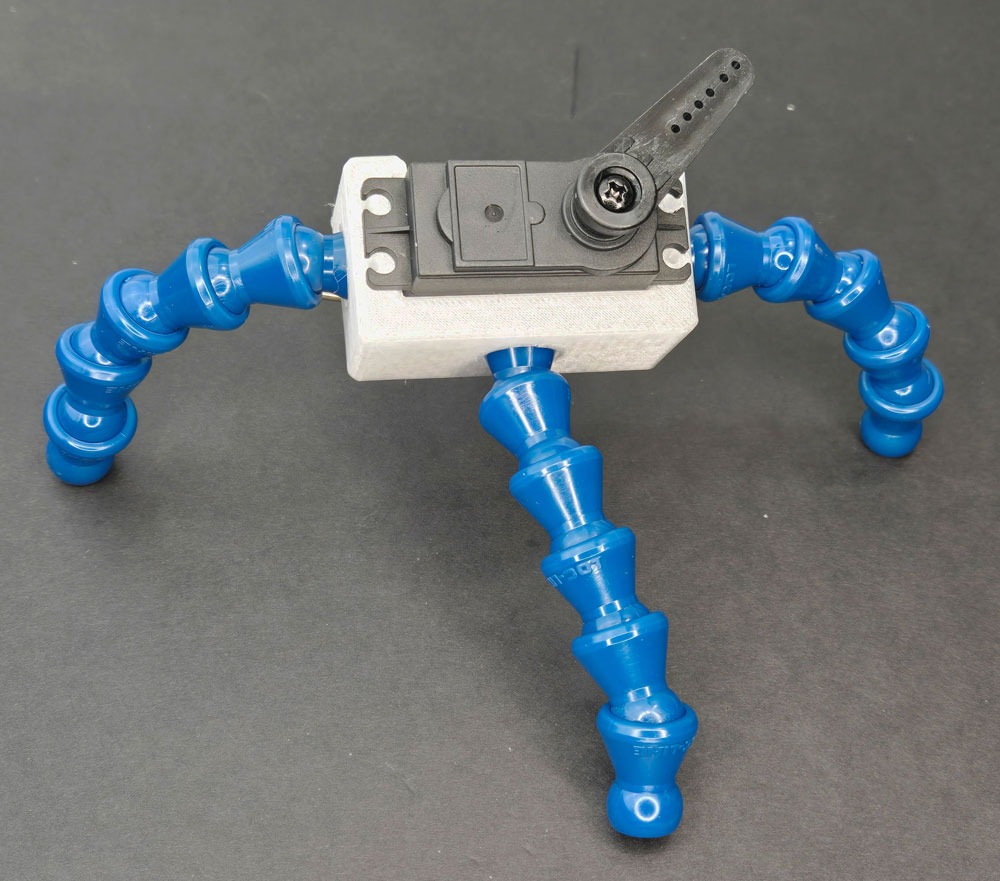
LESSON SNAPSHOT
| Kit | Flexible Mounting: Reach Extender Kit - Student Guide #2 |
|---|---|
| Client | Marcus, Age 14 - Needs wheelchair-mountable hand-raising device for classroom participation |
| Core Concept | Degrees of freedom in mechanical systems; flexible mounting and positioning |
| Prerequisites | Guide #1 (Getting Started with Smart Servo) - Understanding physical computing, basic servo control, button inputs |
| Student Guide | tinyurl.com/SS-STL-REACH |
⚠️ Safety Considerations
- Tapping threads: Supervise students using M5 tap - requires steady perpendicular pressure; debris should be brushed away in ventilated area
- Loc-Line assembly: Bracket installation requires firm bending force; demonstrate proper technique to avoid pinching
- Sharp components: M5 screws have pointed ends when inserted into Loc-Line pieces
What This Kit Teaches
Engineering/Design Focus: This kit introduces degrees of freedom as a fundamental concept in mechanical design while exploring the engineering trade-offs between flexibility and stability. Students learn how serial manipulator systems work by creating a multi-axis positioning device using modular ball-and-socket joints. The hands-on tapping process introduces fundamental fabrication skills while the Loc-Line system demonstrates how simple repeating units can create complex motion capabilities.
Human-Centered Design Connection: The flexible mounting system directly addresses Marcus's need for adjustable positioning in varied classroom environments. Students explore how matching degrees of freedom to actual human needs creates more effective assistive technology than over-engineering with unnecessary complexity.
Standards at a Glance: Primary domains are HCD, STEL, CAD, NGSS - See Appendix for complete alignment
ESSENTIAL TEACHING MOMENTS
Key concepts worth pausing to discuss during the lesson
Moment 1: Understanding Fabrication Through Tapping
Student Guide Reference: Steps 3-6 (Thread tapping process)
Core Idea: Thread tapping transforms a simple hole into a precise mechanical fastener that can hold components together reliably under stress.
Why It Matters: This hands-on fabrication skill reveals how printed parts can be post-processed to add functionality, teaching students that design extends beyond the digital file into physical preparation.
Discussion Prompts to Consider:
- "Why do you think we tap threads instead of just printing them directly into the part?"
- "What would happen if the tap wasn't perpendicular to the surface?"
- "Where else might you use threaded connections in assistive technology?"
Watch For: Students applying too much or too little pressure; not backing the tap out properly; threading at an angle. Consider pre-tapping one or two holes in each part as a backup.
Moment 2: Degrees of Freedom in Serial Manipulators
Student Guide Reference: Educational Content section on Degrees of Freedom
Core Idea: Each ball-and-socket joint adds independent rotational freedom, and connecting multiple joints creates a serial manipulator with compound positioning capabilities.
Why It Matters: This is the fundamental principle behind robot arms, surgical instruments, and articulated mechanisms - understanding it opens the door to more sophisticated engineering design.
Discussion Prompts to Consider:
- "How many different ways can you move just one Loc-Line joint?"
- "What happens to your positioning options when you connect three joints versus one?"
- "Where have you seen similar flexible positioning in everyday tools or devices?"
Extension Opportunity: Have students count degrees of freedom in their own arms (shoulder, elbow, wrist) and compare to the Loc-Line system's capabilities.
Moment 3: Engineering Trade-offs Between Flexibility and Stability
Student Guide Reference: Educational Content on "The Trade-off Between Flexibility and Precision"
Core Idea: More degrees of freedom provide greater adjustability but require more complex control and may sacrifice stability - engineers must balance these competing needs.
Why It Matters: Every mechanical design involves trade-offs; recognizing and intentionally choosing among them is what separates engineering from random tinkering.
Discussion Prompts to Consider:
- "What would happen if we needed the hand-raiser to move automatically multiple times per day?"
- "Can you think of devices that sacrifice adjustability for stability? Why might they make that choice?"
- "How does the Loc-Line's friction-based locking work for Marcus's specific needs?"
Demo/Visual Aid Suggestion: Bring in examples like a camera tripod (stable but adjustable) or a desk lamp with friction joints to illustrate the trade-off concept physically.
Moment 4: Matching Mechanical Complexity to User Context
Student Guide Reference: Client profile and "Finding the Right Balance" section
Core Idea: Marcus doesn't need computer-controlled precision or constant repositioning - he needs occasional adjustment and reliable stability, which makes the Loc-Line solution appropriately matched to his actual needs.
Why It Matters: Over-engineering wastes resources and creates unnecessary complexity; under-engineering fails to solve the problem. Human-centered design means finding the right level of sophistication for the context.
Discussion Prompts to Consider:
- "What specific aspects of Marcus's daily routine make the Loc-Line system better than a motorized adjustable arm?"
- "How might his needs change if he moved between multiple classrooms each day versus staying in one room?"
- "What other assistive technology situations call for 'adjust once, stay put' rather than continuous repositioning?"
MATERIALS & PREPARATION
MATERIALS NEEDED
From this kit:
- Tap Handle, M5 Tap
- ¼" Loc-Line (connected and separate pieces)
- Platform Clamp, Clamp
- Loc-Line Tool, Loc-Line Bracket
- 1 3/8" Wheelchair Clamp (top and bottom)
- 4mm Allen Key
- M5 Screws
From previous kit:
- Smart Servo, Programming Cable
- Phillips Screwdriver, Test Button
- Servo Horn, Mounting Screws
Safety equipment:
- Safety glasses (for tapping debris)
- Well-ventilated workspace
What You Need to Prepare
- Pre-build one complete kit to understand tapping challenges, test Loc-Line connections, and identify optimal teaching sequences
- Test tap quality on sample parts - determine if students need guidance on perpendicularity and pressure
- Prepare visual aids showing degrees of freedom concepts (robot arm diagrams, your own arm as example, or physical models)
- Review student guide pages 7-11 on degrees of freedom and engineering trade-offs
- Set up workstations with organized components and adequate space for assembly (tapping requires stable work surface)
- Pre-separate some Loc-Line pieces if time is limited, or prepare Loc-Line tool demonstration
- Choose assessment approach (see Evaluate section)
- Select extension activities if time allows (see Elaborate section)
Quick Troubleshooting Reference
| If students struggle with... | First, check... | Then try... |
|---|---|---|
| Thread tapping | Tap perpendicularity and whether they're applying steady inward pressure | Demonstrate on scrap material; have them practice on pre-drilled test piece first |
| Stripped or loose threads | Whether they fully backed out the tap; whether they tested with screws before moving on | Re-tap the hole or use next available hole if multiple exist; discuss why testing matters |
| Loc-Line assembly | Whether they're using the tool correctly; whether pieces are fully seated before releasing | Show push-and-twist technique; have them feel the "click" of proper connection |
| Bracket installation | Whether they're bending evenly on both sides; whether Loc-Line pieces are properly inserted first | Demonstrate the flex and snap technique; consider having them work in pairs for this step |
TEACHING PROGRESSION
The student guide provides detailed assembly and content. Use this framework to structure your instruction around their independent work.
1. ENGAGE
How might we understand Marcus's specific challenges with classroom participation and visibility?
Understanding the Challenge
Learning Focus: Students understand Marcus's specific classroom participation challenges and recognize how positioning and adjustability create access.
Suggested Activities
Client Introduction:
- Have students read Marcus's profile in their guide
- Consider: Role-play activity - "Try participating in a quick discussion while keeping one hand at waist level"
- Discuss: What makes this more than just a height problem? What environmental factors matter (classroom size, teacher position, other students)?
Problem Framing:
- Guide students to articulate: "Marcus needs a way to signal his teacher from his wheelchair because his arm strength limits how high he can raise his hand, and in larger classrooms his partial hand-raise isn't visible"
- Identify constraints: Must mount to wheelchair, needs to be visible across room, activated by accessible button, adjustable for different classroom layouts
- Preview: How might flexible positioning help solve visibility problems?
Formative Assessment Ideas:
- Can students explain both the physical limitation (arm strength) and the contextual challenge (classroom visibility)?
- Do they recognize this isn't just about height, but about adjustability and stability?
- Do they see wheelchair mounting as an opportunity rather than just a constraint?
Standards Connection: Primary: HCD #1 (Problem Framing - analyzing multiple factors affecting classroom participation), STEL 1Q (Research to inform design - understanding user context), NGSS ETS1 (Define design problems with criteria and constraints)
2. EXPLORE
How do modular joint systems create positioning flexibility, and what fabrication skills enable reliable assembly?
Building & Discovering
Learning Focus: Students develop precision fabrication skills through thread tapping and discover how modular joint systems create positioning flexibility.
Facilitation Approach
Before Building:
- Students complete Steps 1-2 (component identification)
- Consider: Have students predict which parts need threads and why
- Demonstrate proper tapping technique on a sample part, emphasizing perpendicularity and steady pressure
- Review safety for tapping debris and bracket installation force
During Building:
- Steps 3-6 (Thread tapping): Use Teaching Moment #1 as pause point after successful tapping. Emphasize that testing thread quality now prevents assembly problems later
- Steps 7-9 (Clamp assembly): Encourage students to understand the Loc-Line tool mechanism - it's not pulling apart, it's compressing to release
- Steps 10-12 (Bracket mounting): This requires firm bending - circulate to ensure proper technique and even pressure
- Steps 13-14 (Final assembly): Have students experiment with positioning before final connection - what configurations are possible?
Testing Phase:
- Guide exploration: "How many different positions can you create? What stays stable? What moves easily?"
- Consider: Have students sketch or photograph three very different configurations
- Discuss: How does friction in the joints create the "hold position" behavior?
Formative Assessment Ideas:
- Can students tap threads that hold screws securely?
- Do they connect Loc-Line pieces fully (listening/feeling for the click)?
- Are they exploring multiple configurations or settling for the first one that works?
- Can they explain how the ball-and-socket joints create positioning options?
Standards Connection: Primary: CAD 1.2 (Assembly/fabrication - hands-on tapping and precision assembly), CAD 2.4 (Geometric analysis - understanding joint motion and spatial positioning), NGSS Practice 3 (Planning investigations through systematic testing), STEL 2M (Systems thinking - inputs, processes, outputs in positioning system)
3. EXPLAIN
How do degrees of freedom, serial manipulators, and design trade-offs shape mechanical positioning systems?
Making Sense of Concepts
Learning Focus: Students connect their hands-on experience with flexible joints to the engineering concepts of degrees of freedom, serial manipulators, and design trade-offs.
Suggested Sequence
Process the Experience:
- Reflection: "What surprised you about how the Loc-Line system works? When did you have to problem-solve?"
- Introduce vocabulary using completed assembly: degrees of freedom, serial manipulator, ball-and-socket joint, friction-based locking
- Consider: Have students identify degrees of freedom in their own arm and compare to their build
Explore Core Concepts:
- Use content from student guide's "Understanding Degrees of Freedom" section
- Teaching Moment #2: Explore how each joint adds rotational freedom - have students move one joint, then two, then three, observing compound effects
- Demonstrate with physical models: single fixed rod vs. one joint vs. three joints - what positioning tasks become possible at each level?
- Teaching Moment #3: Discuss the flexibility vs. stability trade-off using their completed assembly and real-world examples (camera tripods, desk lamps, robot arms)
- Extend to real-world applications: surgical robots need many degrees of freedom with computer control; microscopes need stability with manual positioning; Marcus needs occasional adjustment with friction-based stability
Teaching Strategies to Consider:
- Think-pair-share: "Name three devices you use regularly that have adjustable positioning. Do they stay put by friction, locks, or motors?"
- Annotate assembly photos with labels: "3 degrees of freedom per joint," "friction-based locking," "serial manipulator"
- Compare/contrast: Simple hinge vs. ball-and-socket joint - what can each do?
- Create a "degrees of freedom inventory" of classroom objects (door, window, projector mount, adjustable chair)
Connect to User Needs:
- Teaching Moment #4: Discuss why the Loc-Line solution is appropriately sophisticated for Marcus's needs
- Analyze design decisions: Why friction locking rather than motors? Why modular joints rather than a single articulated arm?
- Consider context-specific optimization: How might needs differ in a small classroom vs. large lecture hall? Multiple daily room changes vs. staying in one space?
Formative Assessment Ideas:
- Can students define "degrees of freedom" and count them in a multi-joint system?
- Can they explain the trade-off between flexibility and stability in their own words?
- Do they recognize why the Loc-Line system is well-matched to Marcus's specific needs rather than over- or under-engineered?
- Can they identify degrees of freedom and stability mechanisms in other devices?
Standards Connection: Primary: CAD 1.4 (Explain technical solutions using appropriate vocabulary), HCD #2 (Communicate technical features in terms of user benefits), NGSS Cross-Cutting Concepts (Systems and system models - understanding joint interaction; Structure and function - how joint design enables positioning), STEL 7S (Human factors in design - matching complexity to user needs)
4. ELABORATE
How can we apply positioning and user-centered design concepts to new contexts?
Extension & Application
Learning Focus: Students apply concepts about degrees of freedom, positioning, and user-centered design to new contexts or deepen their understanding through specialized challenges.
Extension Menu
Choose based on available time, student readiness, and learning priorities
Option A: Custom Mounting Design
What Students Do: Design and prototype a custom mounting adapter for a different wheelchair component (cup holder, phone, tablet) using the Loc-Line system
Skills Developed: CAD modeling, contextual reasoning, constraint management, design for specific load requirements
Time Estimate: 2-3 class periods
Standards: HCD #8 (Iteration based on testing), CAD 3.1 & 4.2 (CAD fundamentals and 3D printing), STEL 3F (Apply to another setting)
Option B: Degrees of Freedom Analysis Challenge
What Students Do: Analyze and document degrees of freedom in complex mechanical systems (robot arms, adjustable furniture, camera gimbals) and propose improvements
Skills Developed: Systems analysis, technical observation, engineering reasoning
Time Estimate: 1-2 class periods
Standards: STEL 2M (Systems components), NGSS Cross-Cutting Concept 4 (Systems and system models), CAD 2.4 (Geometric analysis)
Option C: Motorized Positioning Upgrade
What Students Do: Replace one Loc-Line joint with servo motor control, programming automatic positioning or preset positions
Skills Developed: Computational thinking, motor control, trade-off analysis (manual vs. motorized)
Time Estimate: 2-3 class periods
Standards: CSTA (algorithm design, control structures), NGSS Practice 5 (Computational thinking), STEL 3D (Technology to solve problems)
Option D: Mechanical Advantage and Stability Analysis
What Students Do: Calculate or measure the torque required to hold different loads at various positions; determine optimal joint tightness
Skills Developed: Mathematical modeling, experimental design, quantitative reasoning about mechanical systems
Time Estimate: 1-2 class periods
Standards: NGSS Practice 5 (Mathematical thinking), STEL 2S (Quantify concepts), CAD 2.4 (Geometric analysis)
Option E: Accessibility Standards Research
What Students Do: Research ADA requirements for classroom accommodations, compare Marcus's solution to commercial assistive technology, or investigate inclusive education practices
Skills Developed: Research skills, understanding broader social context, policy awareness
Time Estimate: 1-2 class periods
Standards: STEL 7S (Social/cultural impacts), HCD #1 (Problem framing in broader context), STEL 4N (Technology and human interaction)
Differentiation Through Choice
- Guided Support: Option D with templates, measurement guides, and worked examples
- Open-Ended: Option B or E with minimal scaffolding for independent research and analysis
- Student Interest: Allow choice based on whether students prefer hands-on building (A, C), analytical thinking (B, D), or social context (E)
5. EVALUATE
How can students demonstrate understanding of degrees of freedom, engineering trade-offs, and user-centered design?
Demonstrating Learning
Learning Focus: Students demonstrate understanding of degrees of freedom, engineering trade-offs, and user-centered design while reflecting on the problem-solving process.
Recommended Assessment: Performance Demonstration with Technical Explanation
What Students Do: Successfully build the reach extender system and explain how it addresses Marcus's needs using technical vocabulary (degrees of freedom, serial manipulator, friction-based locking, trade-offs)
What You Assess: Assembly accuracy and quality (properly tapped threads, secure connections), technical explanation using appropriate vocabulary, ability to connect mechanical features to user benefits, understanding of design trade-offs
Evidence: Completed functional device + 3-5 minute explanation (verbal or recorded video)
Time Required: Building throughout lesson + 3-5 minutes per student for explanation
Alternative Assessment Options
Option 2: Design Proposal Portfolio - Students document their assembly process, explain degrees of freedom in their system, propose one modification for a different user context, and reflect on trade-offs. Creates evidence of both process and understanding. Good for students who communicate better in writing.
Option 3: Comparative Analysis - Students compare the Loc-Line solution to two alternatives (motorized arm, fixed mounting) using a decision matrix that evaluates degrees of freedom, stability, cost, and user fit. Demonstrates understanding of engineering trade-offs and contextual design. Good for analytical thinkers.
Reflection Prompts
Choose 2-3 based on your learning priorities
- Process: What fabrication skill (tapping, Loc-Line assembly, bracket installation) was most challenging? How did you develop proficiency?
- Concept: Explain degrees of freedom to someone who's never heard the term. Use your assembly as an example.
- Impact: How does flexible positioning specifically help Marcus? What would happen with only fixed positioning?
- Trade-offs: Why is friction-based locking better for Marcus than motor control? What situations would require motors instead?
- Transfer: Where else could you use a flexible mounting system? What would need to change for that application?
Standards Connection: Assessment should provide evidence of: CAD 1.1-1.4 (Technical vocabulary, assembly skills, documentation, communication), HCD #2 (Stakeholder communication), HCD #9 (Design documentation), NGSS Practices (Constructing explanations), STEL 2T (Demonstrate modeling), STEL 7S (Human factors in design)
Sample Assessment Rubric
| Criterion | Developing | Proficient | Advanced |
|---|---|---|---|
| Assembly Quality | Device partially assembled; threads stripped or loose; connections not fully seated | Device fully assembled and functional; threads hold securely; all connections properly made | Device assembled with precision and attention to detail; tapping perpendicular; connections fully seated with proper friction; ready for reliable use |
| Technical Vocabulary | Uses everyday language ("bendy parts," "connects"); few technical terms | Uses key technical terms correctly: degrees of freedom, ball-and-socket joint, serial manipulator, friction-based locking | Uses technical vocabulary precisely and naturally; defines terms clearly; distinguishes between related concepts (flexibility vs. instability) |
| Degrees of Freedom Concept | Describes what device does ("it can move around") but not how or why | Explains how multiple joints create positioning options through rotational freedom; understands compound effect | Explains degrees of freedom quantitatively; analyzes how joint count affects positioning capability; connects to real-world serial manipulators |
| Engineering Trade-offs | Mentions that device is adjustable or stable | Explains trade-off between flexibility and stability; recognizes why friction locking serves this application | Analyzes multiple trade-offs (flexibility/stability, manual/motorized, modular/custom); justifies design choices based on user context; proposes context-specific optimizations |
| User-Centered Thinking | Mentions that device helps Marcus raise his hand | Explains how positioning flexibility and stability address Marcus's classroom participation needs | Analyzes how design matches Marcus's specific context (adjustment frequency, classroom environment, user capabilities); proposes modifications for different scenarios; demonstrates deep empathy |
CONNECTIONS & CONTEXT
Learning Sequence
What Students Already Know (from Guide #1: Getting Started):
Basic servo control and programming, button inputs, physical computing cycle (sense-think-act), CircuitPython fundamentals, connecting power and components, working through code snippets for testing
What's New in This Kit:
Thread tapping and post-processing fabrication skills, degrees of freedom concept, serial manipulator systems, ball-and-socket joint mechanics, friction-based positioning, engineering trade-offs between flexibility and stability, matching mechanical complexity to user needs
Where This Leads (in future kits):
Gear systems and mechanical advantage (Kit #3), motorized positioning and multi-axis control (Kit #10 - Pan & Tilt), complex linkage mechanisms (Kit #11 - DrawBot), design for specific mechanical requirements across all subsequent kits
Cumulative Skills Being Reinforced:
User empathy and problem framing, iterative testing and observation, connecting technical features to user benefits, systems thinking, design documentation
Cross-Curricular Connections
Mathematics
Geometry and Spatial Reasoning: Analyzing angles, rotational degrees of freedom, and compound positioning appears naturally in Steps 10-14 when students configure the Loc-Line system. Degrees of freedom counting provides practice with combinatorial thinking. Extension Option D provides quantitative analysis of torque, load, and stability.
Science
Forces and Motion: Friction-based locking demonstrates how surface forces can counteract gravitational and applied loads (Educational Content section). Ball-and-socket joints show how geometry enables multi-directional rotation. The balance between flexibility and stability illustrates force distribution in mechanical systems.
Social Studies
Disability Rights and Accessibility: Marcus's classroom participation challenge connects to ADA legislation, inclusive education history, and civil rights. Discussion of why assistive technology matters for equal access provides social context. Extension Option E explores accessibility standards and policies directly.
English/Language Arts
Technical Communication: Explaining degrees of freedom requires clear definition and examples. Assembly documentation practices technical writing. Design proposals for modifications practice persuasive writing with technical evidence. Reflection prompts develop metacognitive writing skills.
Additional Resources
For Teachers:
- Student Guide: tinyurl.com/SS-STL-REACH
- 3D Printing Files: tinyurl.com/SS-STL-REACH
- Code Snippets and Reset Files: tinyurl.com/SmartServoSnips
- Contact Support: Judson@WagnerLabs.net
- Project Website: WagnerLabs.net/SmartServo
For Students:
- Assembly: Detailed visual instructions in student guide Steps 1-14
- Concepts: "Educational Content: Understanding Degrees of Freedom" in guide pages 7-9
- Help: Quick troubleshooting table; code reset at tinyurl.com/SmartServoSnips
Extension Reading/Resources:
- Simple articles on robot arm design and industrial automation (age-appropriate maker magazines)
- Videos showing multi-axis positioning systems (industrial robots, camera gimbals, surgical robots)
- Information about classroom accommodations and inclusive education practices
- ADA resources for students: search "ADA for kids" or "disability rights education"
APPENDIX
COMPLETE STANDARDS ALIGNMENT
CAD Competencies
| Code | Competency | Where Addressed | How to Emphasize |
|---|---|---|---|
| CAD 1.1 | Technical vocabulary | Phase 2 (Building) Steps 3-6, Phase 3 (Explain) - Introduce during tapping and joint assembly; deepen with degrees of freedom concepts; use Teaching Moments #2 and #3 | Have students create illustrated glossaries with assembly photos; use vocabulary in verbal explanations; identify terms in real-world contexts |
| CAD 1.2 | Assembly/fabrication | Phase 2 (Building) Steps 3-14 - Thread tapping, Loc-Line connections, bracket installation | Observe technique during tapping; pause to demonstrate proper Loc-Line tool use; assess completed assembly quality; emphasize that fabrication skill matters |
| CAD 1.3 | Technical documentation | Phase 5 (Evaluate) - Portfolio option; Extension Option A requires documentation | Provide exemplars of assembly documentation; require photo-documentation of key steps; emphasize clarity and detail in written specs |
| CAD 1.4 | Explain technical solutions | Phase 3 (Explain) all concepts, Phase 5 (Evaluate) - Explanation component | Use sentence frames: "The [feature] allows [function] which helps [user] by..."; require technical vocabulary in explanations; connect features to benefits |
| CAD 2.4 | Geometric analysis | Phase 2 (Testing) - Exploring positioning configurations; Teaching Moment #2 on degrees of freedom | Have students sketch different configurations; discuss joint angles and compound motion; analyze spatial relationships explicitly |
| CAD 3.1 | CAD fundamentals | Extension Option A - Custom mounting design | If pursuing extension, provide CAD tutorials specific to mounting bracket design; emphasize measurement accuracy |
| CAD 4.2 | 3D printing preparation | Extension Option A if designing custom parts | Discuss support structures for ball-and-socket features; consider print orientation for threaded holes |
| CAD 4.1 | Manufacturing awareness | Phase 2 Steps 3-6 - Thread tapping as post-processing | Explicitly discuss why threads are tapped rather than printed; explore other post-processing techniques (sanding, drilling, assembly) |
CSTA Computer Science Standards
| Code | Standard | Where Addressed | How to Emphasize |
|---|---|---|---|
| Computing Systems: Devices | Describe computing device parts and functions | Phase 1 (Engage), Phase 2 - Smart Servo as control system | Review how servo, microcontroller, and button work together; reference Guide #1 concepts |
| Computing Systems: Hardware & Software | Model hardware and software system interactions | Throughout - especially if programming positioning sequences | Diagram the full system: button input → code → servo movement → positioning; discuss feedback |
| Algorithms & Programming: Control | Programming control structures | If programming custom positioning or Extension Option C | Review control structures from Guide #1; apply to positioning sequences; introduce arrays for preset positions |
HCD Skills & Tools
| Code | Skill/Tool | Where Addressed | How to Emphasize |
|---|---|---|---|
| HCD #1 | Problem Framing | Phase 1 (Engage) - Marcus's profile and classroom context | Use multiple lenses: physical (arm strength), environmental (classroom size), social (participation equity); identify root causes vs. symptoms |
| HCD #2 | Stakeholder Communication | Phase 3 (Explain) Teaching Moment #4, Phase 5 (Evaluate) - Presentations | Practice translating technical features (degrees of freedom) into user benefits (flexible positioning); avoid jargon when explaining to non-engineers |
| HCD #5 | Knowledge Development | Phase 3 (Explain) - Learning degrees of freedom and trade-offs | Make learning process visible: "We need to understand X to design Y"; document questions that arise; balance research with building |
| HCD #6 | Stakeholder Dialogue | Phase 1 (Engage) - Discussing Marcus's needs and follow-up questions | Role-play client interviews; practice asking open-ended questions; consider how to gather feedback on prototypes |
| HCD #8 | Iteration Cycles | Phase 2 (Testing different configurations), Extension Option A | Emphasize that testing reveals opportunities, not failures; document changes and reasoning; test multiple configurations before settling |
| HCD #9 | Design Documentation | Phase 5 (Evaluate) - Portfolio option | Teach clear documentation practices: photos, annotations, specifications; explain why documentation enables replication and improvement |
| HCD Tool 1.1 | Interview | Phase 1 (Engage) - Understanding client needs | Provide interview question frameworks; practice empathetic listening; distinguish between stated needs and underlying requirements |
| HCD Tool 1.2 | Problem Statement | Phase 1 (Engage) - Articulating Marcus's challenge | Use template: "[User] needs [what] because [why], which matters because [impact]"; revise based on deeper understanding |
| HCD Tool 2.1 | Criteria & Constraints | Phase 1 (Engage), Phase 3 (Explain) Teaching Moment #4 | List explicit: wheelchair mounting, classroom visibility, button activation, adjustability, stability; discuss how each shapes design |
| HCD Tool 3.1 | Sketching | Phase 1 (Engage) or Extension Option A | Encourage quick visualization of positioning ideas; sketch multiple configurations before building; use sketches to communicate intent |
| HCD Tool 4.2 | Technical Drawings | Extension Option A - CAD for custom mounting | If pursuing CAD extension, emphasize precision and proper dimensioning; connect drawings to fabrication requirements |
| HCD Tool 4.3 | Proof of Concept | Phase 2 (Building) - Complete functional assembly | Discuss what proof of concept demonstrates (feasibility) vs. what it doesn't yet address (durability, aesthetics); use to drive iteration |
| HCD Tool 5.2 | Results Analysis | Phase 2 (Testing configurations) | Guide systematic configuration testing; have students document what works and what doesn't; gather hypothetical user feedback |
NGSS Science & Engineering Practices
| Code | Practice | Where Addressed | How to Emphasize |
|---|---|---|---|
| Practice 1 | Asking questions and defining problems | Phase 1 (Engage) - Understanding Marcus's challenge | Frame as engineering problem with clear criteria (visibility, adjustability) and constraints (wheelchair mounting, user strength); discuss how problem definition shapes solutions |
| Practice 2 | Developing and using models | Phase 2 (Building) - Physical assembly as positioning model | Discuss how the Loc-Line model demonstrates degrees of freedom and positioning capabilities; compare model to full-scale implementation needs |
| Practice 3 | Planning and carrying out investigations | Phase 2 (Testing) - Systematic configuration exploration | Guide students to test multiple configurations methodically; collect data about stable vs. unstable positions; vary joint positions systematically |
| Practice 5 | Using mathematics and computational thinking | Extension Option D - Torque and stability calculations | Make quantitative thinking visible; estimate loads; calculate mechanical advantage; use data to make design decisions |
| Practice 6 | Constructing explanations | Phase 3 (Explain) - All teaching moments and concept discussions | Require cause-and-effect reasoning: "Ball-and-socket joints enable [motion] because [geometry]"; connect structure to function; use evidence from assembly |
| Practice 8 | Obtaining, evaluating, and communicating information | Phase 3 (Explain), Phase 5 (Evaluate), Extension Option E | Research existing positioning systems; evaluate design approaches; present technical information clearly to various audiences |
NGSS Core Ideas
| Code | Core Idea | Where Addressed | How to Emphasize |
|---|---|---|---|
| ETS1 | Engineering Design | Throughout - especially Phase 1, 4, 5 | Emphasize iterative process: define problem → develop solutions → optimize; discuss criteria (visibility, adjustability) and constraints (mounting, stability) explicitly |
| ETS2 | Links Among Engineering, Technology, Science, and Society | Phase 1 (Client context), Teaching Moment #4, Extension Option E | Discuss how engineering enables classroom participation equity; consider broader assistive technology landscape; explore social impacts of access technology |
NGSS Cross-Cutting Concepts
- Cause and Effect: Phase 2, 3 - How joint geometry creates rotational freedom; how friction creates locking; how serial connection multiplies positioning options
- Systems and System Models: Phase 2, 3 - Understanding device as integrated positioning system with interdependent joints; modeling with physical assembly
- Structure and Function: Phase 3 - How ball-and-socket structure enables multi-directional rotation; how friction surfaces enable position holding
- Stability and Change: Phase 3 Teaching Moment #3 - Exploring trade-offs between adjustability (change) and position holding (stability)
STEL Standards
| Code | Standard | Where Addressed | How to Emphasize |
|---|---|---|---|
| STEL 1J | Develop innovative products solving problems based on needs | Throughout - designing for Marcus's classroom participation | Center all design decisions on Marcus's specific needs; discuss innovation in matching mechanical system to user context |
| STEL 1M | Apply creative problem-solving strategies | Extension Options A, B - Applying concepts to new contexts | Encourage multiple approaches; value novel solutions; discuss how Loc-Line system itself is creative positioning solution |
| STEL 1Q | Conduct research to inform design | Phase 1 (Engage), Extension Option E - Understanding user context and accessibility | Make research purposeful: investigating classroom environments, wheelchair mounting options, visibility requirements; connect findings to design decisions |
| STEL 2M | Systems (inputs, processes, outputs, feedback) | Phase 2 (Testing), Phase 3 Teaching Moment #2 - Understanding joint system | Explicitly label system components: input (manual positioning), process (joint rotation and friction locking), output (stable position), feedback (visual and tactile confirmation) |
| STEL 2S | Quantify technical concepts | Extension Option D - Stability and torque calculations | Connect numbers to real meaning; measure angles, estimate loads, calculate holding forces; use calculations to optimize joint tightness |
| STEL 2T | Demonstrate conceptual, graphical, and physical modeling | Throughout - sketching, assembly, testing | Require sketches before building; use assembly as physical model; photograph configurations; discuss how each model type serves different purposes |
| STEL 2W | Select resources balancing availability, cost, desirability, and waste | Phase 2 (Building) - Using modular Loc-Line system | Discuss advantages of modular system: reconfigurable, repairable, no custom fabrication needed; consider trade-offs vs. custom-designed solution |
| STEL 2X | Cite examples of criteria and constraints affecting design | Phase 1 (Engage), Phase 3 Teaching Moment #4 | List explicit constraints: wheelchair mounting, visibility distance, button activation, user strength; discuss how each shapes the solution |
| STEL 3B | Demonstrate how simple technologies combine to form complex systems | Phase 2 (Building), Phase 3 Teaching Moment #2 | Show how simple ball-and-socket joints combine to create serial manipulator; connect to microcontroller + servo + mounting = complete system |
| STEL 3D | Employ technology to solve problems that could not be solved otherwise | Phase 1 (Engage), Phase 3 - Assistive technology enabling participation | Discuss what Marcus's alternatives are without this technology; explore how engineering creates access and independence |
| STEL 3F | Apply a product, system, or process from one setting to another | Extension Options A, B - Transferring positioning system to new applications | Explicitly discuss what transfers (degrees of freedom principles, friction locking) and what must change (load requirements, mounting); practice analogical thinking |
| STEL 3H | Transfer knowledge from one technology to another | Extension Options - Applying positioning concepts broadly | Make connections explicit: Loc-Line principles appear in desk lamps, camera mounts, robot arms; identify underlying principles that transfer |
| STEL 7Q | Apply engineering design process | Throughout all phases - especially structured in Phase 1, 4, 5 | Use explicit design process framework: empathize (Marcus's needs) → define (problem statement) → ideate (positioning approaches) → prototype (build) → test (configurations) |
| STEL 7S | Create solutions applying human factors in design | Phase 1 (Engage), Phase 3 Teaching Moment #4 - Matching to Marcus's needs | Center human capabilities and limitations; discuss manual adjustment frequency, required precision, environmental factors; match mechanical complexity to human context |
SAMPLE ASSESSMENT RUBRIC
Performance Demonstration - Assembly & Technical Explanation
| Criterion | Developing | Proficient | Advanced |
|---|---|---|---|
| Assembly Quality | Device partially assembled; threads stripped or loose; connections not fully seated | Device fully assembled and functional; threads hold securely; all connections properly made | Device assembled with precision and attention to detail; tapping perpendicular; connections fully seated with proper friction; ready for reliable use |
| Technical Vocabulary | Uses everyday language ("bendy parts," "connects"); few technical terms | Uses key technical terms correctly: degrees of freedom, ball-and-socket joint, serial manipulator, friction-based locking | Uses technical vocabulary precisely and naturally; defines terms clearly; distinguishes between related concepts (flexibility vs. instability) |
| Degrees of Freedom Concept | Describes what device does ("it can move around") but not how or why | Explains how multiple joints create positioning options through rotational freedom; understands compound effect | Explains degrees of freedom quantitatively; analyzes how joint count affects positioning capability; connects to real-world serial manipulators |
| Engineering Trade-offs | Mentions that device is adjustable or stable | Explains trade-off between flexibility and stability; recognizes why friction locking serves this application | Analyzes multiple trade-offs (flexibility/stability, manual/motorized, modular/custom); justifies design choices based on user context; proposes context-specific optimizations |
| User-Centered Thinking | Mentions that device helps Marcus raise his hand | Explains how positioning flexibility and stability address Marcus's classroom participation needs | Analyzes how design matches Marcus's specific context (adjustment frequency, classroom environment, user capabilities); proposes modifications for different scenarios; demonstrates deep empathy |
Alternate Focus Areas
Choose 3-4 based on your priorities:
- Fabrication Skills: Tapping quality, assembly technique, tool use, precision
- Systems Thinking: Understanding joint interaction, serial effects, system-level behavior
- Documentation Quality: Clear photos, accurate descriptions, organized presentation
- Communication Clarity: Audience-appropriate language, logical flow, effective visuals
- Design Reasoning: Justification of choices, consideration of alternatives, context awareness
- Problem-Solving Process: Troubleshooting approach, iteration, learning from challenges
KEY VOCABULARY
Students should be able to define and use these terms:
Degree of Freedom
An independent way something can move in space; each separate motion direction or rotation that can be controlled separately.
Example: Each ball-and-socket joint in the Loc-Line provides three rotational degrees of freedom; your shoulder joint has similar freedom of movement in multiple directions.
Serial Manipulator
A mechanical system where multiple joints are connected in sequence, with each joint's motion building on the previous ones to create compound positioning capability.
Example: The Loc-Line mounting system connects multiple ball-and-socket joints end-to-end, creating a serial manipulator similar to a robot arm or your own arm (shoulder-elbow-wrist).
Ball-and-Socket Joint
A type of joint that allows rotational motion in multiple directions by having a spherical component that rotates within a cup-shaped holder.
Example: Each Loc-Line connection uses a ball-and-socket design that allows the segment to tilt and rotate in almost any direction.
Friction-Based Locking
A method of holding position by using surface friction between components rather than mechanical locks or motors.
Example: The Loc-Line joints stay in position because friction between the ball and socket resists movement; tightening the connection increases friction and stability.
Thread Tapping
The process of cutting spiral grooves (threads) into a hole so screws can grip and hold securely.
Example: We tapped M5 threads into the 3D-printed mounting parts so the screws would hold the Loc-Line tubing securely without pulling out.
Post-Processing
Manufacturing steps performed after the initial fabrication to add functionality or improve quality.
Example: Thread tapping is a post-processing step we do after 3D printing because printed threads often aren't strong or precise enough for mechanical fasteners.
Perpendicular
At a 90-degree angle; forming a right angle with a surface or line.
Example: When tapping threads, the tap must be held perpendicular to the surface so the threads align properly and the screw goes in straight.
Engineering Trade-off
A design decision where improving one characteristic requires accepting less of another characteristic.
Example: The trade-off between flexibility and stability means adding more degrees of freedom makes positioning more adjustable but potentially less rigid; Marcus's design balances both needs.
Assistive Technology
Devices, equipment, or systems that help people with disabilities perform tasks, improve functional capabilities, or increase independence.
Example: Marcus's reach extender is assistive technology that helps him participate in classroom discussions despite limited arm strength.
Modular System
A design approach using standardized, interchangeable components that can be connected in different configurations.
Example: The Loc-Line system is modular - you can connect segments in various lengths and arrangements to suit different applications without custom fabrication.
NOTES & CUSTOMIZATION
What Worked in My Class:
[Space for teacher notes]
Adaptations I Made:
[Space for teacher notes]
Student Insights or Innovations:
[Space for teacher notes]
Timing Notes:
[Space for teacher notes]
Assessment Modifications:
[Space for teacher notes]
For Next Time:
[Space for teacher notes]
Smart Servo Lesson Structure v5.0 | Designed to support teacher autonomy while providing comprehensive guidance