PAN & TILT: PRECISION POSITIONING KIT
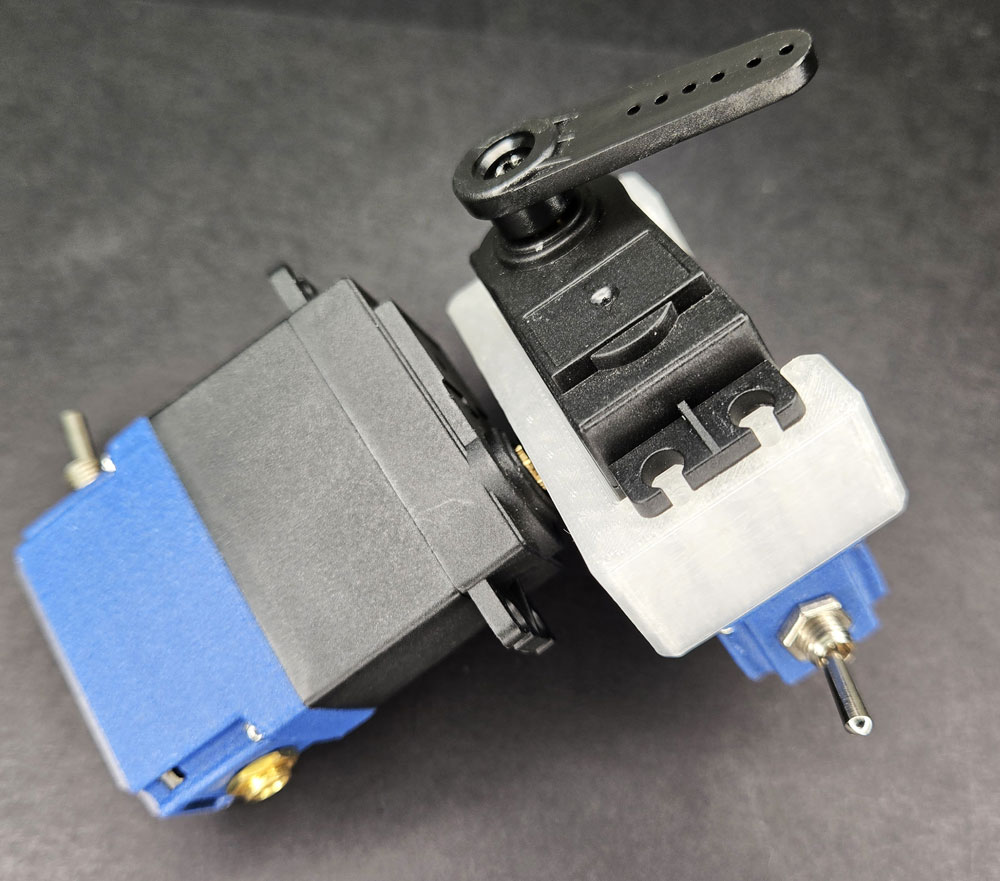
LESSON SNAPSHOT
| Kit | Pan & Tilt: Precision Positioning Kit - Student Guide #10 |
|---|---|
| Client | Thomas Anderson, Age 52 - Photography and art teacher with essential tremor needing smooth, controllable positioning system for cameras and easels |
| Core Concept | Multi-axis control systems; coordinated servo movement; pan-tilt mechanisms in real-world applications |
| Prerequisites | Previous Smart Servo kits - Understanding servo control, button inputs, basic programming, and mechanical assembly |
| Time Estimate | 90-120 minutes (assembly: 30 min, exploration: 30 min, programming: 30-60 min) |
⚠️ Safety Considerations
- Servo coordination: When testing two-axis movement, ensure workspace is clear of obstacles and mounting is secure
- Power management: Dual battery pack provides power to both servos simultaneously - monitor for overheating during extended testing
- Weight capacity: Pan & tilt system designed for lightweight items (cameras, small easels) - do not exceed recommended load
- Pinch points: Moving servos create pinch hazards where adapter and mounting surfaces meet
What This Kit Teaches
Engineering/Design Focus: This kit introduces multi-axis control systems and the fundamental principles of pan-tilt mechanisms. Students learn how independent axes combine to create complete directional control and explore the coordination challenges that arise when multiple motors must work together.
Human-Centered Design Connection: The pan-tilt system directly addresses Thomas's need for tremor-free positioning control. By eliminating the need for manual fine adjustments, this assistive technology enables him to demonstrate photography techniques with the precision his students need to see.
Real-World Context: Pan-tilt mechanisms appear throughout modern technology - from security cameras that scan automatically to broadcast cameras tracking sports action, satellite dishes maintaining signal locks on moving ships, and astronomical telescopes making thousands of micro-corrections per second.
Standards at a Glance: Primary domains are HCD, STEL, CAD, NGSS, Computer Science - See appendix for complete alignment
MATERIALS NEEDED
New in this kit:
- Pan & Tilt Mounting Adapter
- 3.5mm AUX Splitter
From previous kits:
- Two Smart Servos
- Two Arm Servo Horns (with Spline Hub)
- Testing Button
- Dual Battery Pack
- M3 Spline Screws (2)
- Programming Cable (optional, for code modifications)
Additional resources:
- Computer with access to tinyurl.com/SmartServoSnips (for factory reset code)
- 3D printer access (optional, for custom mounting adaptations)
What You Need to Prepare
- Pre-build one complete pan & tilt assembly to understand servo coordination challenges
- Test the 3.5mm AUX splitter with dual servo setup to demonstrate synchronized control
- Prepare visual aids or videos showing pan-tilt systems in real-world applications (security cameras, telescopes, gimbals)
- Review student guide section on "Understanding Multi-Axis Control" and prepare discussion prompts
- Consider setting up demonstration items (small camera, phone, lightweight object) for students to position
- Organize workstations with clear labeling of new vs. previous kit components
- If teaching programming modifications, prepare example code snippets for coordinated movement patterns
Learning Objectives
By the end of this lesson, students will be able to:
- Explain how independent axes combine to create multi-dimensional positioning control
- Assemble a functional two-axis pan-tilt mechanism with proper servo horn alignment and secure mounting
- Demonstrate coordinated control of two servos using a shared input signal through the AUX splitter
- Analyze the trade-offs between independent servo control and synchronized control for different applications
- Connect pan-tilt principles to real-world applications in robotics, photography, and assistive technology
- Apply human-centered design thinking to evaluate how assistive technology can compensate for physical limitations
ESSENTIAL TEACHING MOMENTS
Key concepts worth pausing to discuss during the lesson
Moment 1: Understanding Perpendicular Axes
Student Guide Reference: Step 8 and "Understanding Multi-Axis Control" section
Core Idea: Two servos rotating in perpendicular planes (pan horizontal, tilt vertical) create the ability to point in any direction. This is fundamentally different from two servos rotating in the same plane, which would only add range, not dimensionality.
Why It Matters: Understanding how perpendicular axes combine to create multi-dimensional control is foundational to robotics, CNC machining, 3D printing, and countless other technologies. This principle scales from two axes to three (adding roll) to six or more in industrial robot arms.
Discussion Prompts to Consider:
- "How is controlling two perpendicular axes different from just making one axis twice as strong?"
- "Can you reach every position in space with just pan and tilt? What positions can't you reach?"
- "What third axis would you add if you needed to keep a camera level while panning and tilting?"
- "Where have you seen this perpendicular axis idea before?" (Hint: graphing on X/Y coordinates, latitude/longitude on maps)
Watch For: Students may initially think the two servos just add more movement in the same direction rather than understanding they create movement in different dimensions. Use hand gestures or physical demonstrations to clarify.
Extension Opportunity: Have students explore what happens when axes aren't perfectly perpendicular - how does this affect positioning capability and control?
Moment 2: Independence vs. Coordination in Control Systems
Student Guide Reference: Step 6 (AUX splitter connection) and "From Two Axes to Many" section
Core Idea: The AUX splitter creates synchronized control where one button triggers both servos simultaneously. This is useful for some applications but limits flexibility - sometimes you want axes to move independently, and sometimes you want them coordinated in complex patterns.
Why It Matters: Real-world multi-axis systems must solve this challenge constantly. A camera tracking an athlete needs pan and tilt to move in coordinated patterns (not independently), while a surgical robot arm needs each axis under precise independent control.
Discussion Prompts to Consider:
- "What are the advantages of having one button control both servos at once?"
- "What are the limitations? When might you want separate control?"
- "How could we modify this system to allow independent control of each axis?"
- "Think about a video game controller - does it control multiple axes independently or in coordination? Why?"
Watch For: This is an excellent moment to discuss programming and control system architecture. Advanced students might recognize that the current setup is hardware-limited to synchronized control, but software could enable complex coordinated movements.
Coding Connection: If students are interested in programming custom movements, this is the perfect entry point to discuss how code could create coordinated movement patterns (like following a circular path) that require both axes moving at different rates simultaneously.
Moment 3: Stability as Assistive Technology
Student Guide Reference: Thomas's profile and "Stability and Precision" section
Core Idea: Essential tremor causes involuntary shaking that makes fine positioning impossible by hand. A motorized system doesn't just add convenience - it fundamentally changes what Thomas can demonstrate to his students. Once positioned, motors hold with rock-solid stability that human hands cannot match.
Why It Matters: This highlights how assistive technology doesn't just help people do things they can already do - it can enable entirely new capabilities. Understanding this shifts the design mindset from "accommodation" to "augmentation."
Discussion Prompts to Consider:
- "What's the difference between Thomas using his hands with effort versus using this motorized system?"
- "How might smooth, tremor-free positioning change what he can teach his students?"
- "Where else do people need positioning stability that hands can't provide?" (surgery, microscopy, precision manufacturing, astrophotography)
- "Is this just 'helping someone with a disability' or is this creating a capability that even people without tremor might want?"
Watch For: Students should recognize that Thomas isn't just getting back to "normal" capability - he's getting superhuman stability and repeatability. This reframes assistive technology as powerful rather than compensatory.
1. ENGAGE
How does essential tremor affect Thomas's ability to demonstrate photography techniques, and what kind of control does he need?
Understanding the Challenge
Learning Focus: Students understand Thomas's specific instructional challenges and recognize how multi-axis positioning enables tremor-free demonstration of composition and framing techniques.
Client Introduction
Have students read Thomas's profile in their guide. Key points to emphasize:
- Thomas is an experienced photography and art teacher with deep subject knowledge
- Essential tremor is a movement disorder causing involuntary shaking - it's not a loss of knowledge or skill, but a physical challenge in executing fine motor tasks
- Photography instruction requires demonstrating subtle adjustments in camera angle, composition, and framing
- His students include people with disabilities who benefit from clear, stable demonstrations
Suggested Discussion Activity
Experience Simulation: Have students try to demonstrate something while keeping their hands in constant motion (shake their hands deliberately while trying to point at something specific on a board or screen). Ask:
- How difficult is it to make precise adjustments?
- How does this affect your confidence in demonstrating?
- Would it be easier to just avoid demonstrations altogether?
Problem Framing
Guide students to articulate Thomas's specific need:
"Thomas needs a positioning system that can smoothly and precisely adjust camera and easel angles without hand tremor interference, allowing him to demonstrate composition techniques to his students with disabilities."
Key constraints to identify:
- Must allow positioning in two dimensions (horizontal and vertical angles)
- Must hold position stably once set
- Must be smooth enough for instructional demonstrations (not jerky movements)
- Should be controllable with simple inputs
Formative Assessment Ideas:
- Can students explain how essential tremor specifically impacts demonstration teaching (not just photography itself)?
- Do they recognize that stability and smoothness matter as much as positioning capability?
- Can they identify why two-axis control is necessary rather than one-axis control?
- Do they understand this is about enabling teaching, not just adapting photography?
Standards Connection: HCD #1 (Define problems from client perspective), NGSS ETS1-A (Define criteria and constraints), STEL 1Q (Research to inform design)
2. EXPLORE
How do we assemble a two-axis positioning system, and what does each component contribute?
Building & Discovering
Learning Focus: Students assemble the pan-tilt mechanism following the guide and discover through hands-on exploration how the mechanical system creates multi-dimensional control.
Assembly Guidance (Steps 1-8 in Student Guide)
Step 3 - Servo Horn Insertion: Students must align the Spline Hub correctly with the adapter hole. Common mistake: forcing the horn at an angle. The spline should slide in smoothly when properly aligned.
Step 4 - First Servo Attachment: This servo will control one axis (typically pan/horizontal rotation). Emphasize careful spline alignment before tightening the M3 screw. A loose connection here will cause slippage and loss of positioning control.
Step 5 - Second Servo Installation: The compliant part design requires bending the adapter slightly to snap the second servo into place. This is intentional - the flexibility ensures a secure friction fit. Students may be hesitant to apply the necessary force; demonstrate or guide them through the first one.
Step 6 - Control System Connection: The AUX splitter is the key innovation here. One button press sends the same signal to both servos simultaneously. This is useful for some applications but limits independent axis control.
Step 8 - Understanding the 2-Axis System: This is the critical conceptual moment. Have students physically manipulate the assembled system (without power) to feel how each servo controls movement in a different plane. Pan rotates around a vertical axis; tilt rotates around a horizontal axis.
Exploration Activities
Physical Exploration (5-10 minutes):
- Before powering on, have students manually rotate each servo and observe the range of motion
- Ask: "Can you position this to point at any corner of the room? What about the ceiling? The floor?"
- Have them describe which servo controls which direction
Powered Testing (10-15 minutes):
- Connect power and test button
- Observe how both servos respond simultaneously to button press
- Try positioning a lightweight object (phone, small camera, marker) on the mounting surface
- Test stability: does it hold position when released?
Formative Assessment Ideas:
- Can students correctly identify which servo controls pan and which controls tilt?
- Do they understand that perpendicular axes create two-dimensional positioning capability?
- Can they explain why the AUX splitter causes synchronized rather than independent control?
- Are they making connections to previous kits (servo control, button inputs, mechanical mounting)?
Standards Connection: NGSS MS-ETS1-2 (Evaluate competing design solutions), STEL 2E (Build and test prototypes), CAD Standards (Mechanical assembly and alignment)
3. EXPLAIN
What are the fundamental principles of multi-axis control, and how do they apply to real-world systems?
Connecting Concepts
Learning Focus: Students articulate the engineering principles behind multi-axis control systems and connect their hands-on experience to broader applications.
Core Concept 1: Degrees of Freedom
A degree of freedom is an independent way something can move. The pan-tilt system has two rotational degrees of freedom:
- Pan (yaw): Rotation around the vertical axis - like shaking your head "no"
- Tilt (pitch): Rotation around the horizontal axis - like nodding your head "yes"
Teaching Point: Each axis is independent - you can change pan without affecting tilt position, and vice versa. This independence is what makes multi-axis control powerful.
Discussion Prompt: Coordinate Systems
Ask students to connect this to math concepts they know:
- "When you graph a point on an X-Y coordinate plane, you're using two independent axes to specify a 2D position. How is that similar to pan and tilt?"
- "Latitude and longitude on a map work the same way - two perpendicular measurements that can specify any location on Earth's surface."
Core Concept 2: Serial vs. Parallel Manipulation
The pan-tilt system is a serial manipulator - the second servo mounts to the output of the first servo. This means:
- Movement of the base servo affects the position of the entire system
- Movement of the second servo only affects its own output
- The workspace is determined by the combined reach of both servos
Contrast this with parallel manipulators where multiple actuators work together to control a single end point (example: flight simulator platforms, some 3D printer designs).
Core Concept 3: Coordinated vs. Independent Control
The current setup uses synchronized control (both servos receive the same signal). Discuss the trade-offs:
| Control Type | Advantages | Limitations |
|---|---|---|
| Synchronized (current) | Simple wiring; both axes move together; single input control | Cannot position axes independently; limited movement patterns; cannot create complex paths |
| Independent | Full positioning control; complex movement patterns possible; precise adjustments per axis | Requires separate controls for each axis; more complex interface; harder to coordinate manually |
| Programmed Coordination | Can create smooth coordinated movements; repeatable patterns; can follow complex paths | Requires programming; computational control system; more complex setup |
Real-World Applications Discussion
Connect the student guide's "Pan and Tilt Systems in the Real World" section to concrete examples:
Security Cameras: Use programmed coordination to scan areas automatically, then independent control when operators need to focus on specific regions.
Broadcast Cameras: Camera operators manually control both axes independently using joystick controllers, but advanced systems can add programmed "follow" modes that coordinate axes to track moving subjects.
Telescope Mounts: Must coordinate pan and tilt continuously to counteract Earth's rotation. The mount must know the current time, location, and target object's position to calculate correct axis movements.
Surgical Robots: Surgeons control multiple axes independently through master controllers that translate their hand movements into coordinated robot arm movements at the surgical site.
Formative Assessment Ideas:
- Can students explain degrees of freedom in their own words and give examples beyond pan-tilt?
- Do they understand why perpendicular axes create two-dimensional control?
- Can they articulate when synchronized vs. independent control would be preferable?
- Are they making connections to coordinate systems from math?
- Can they identify pan-tilt principles in other technologies they've encountered?
Standards Connection: NGSS MS-PS2-2 (Plan investigation of motion), CCSS.MATH.6.NS.C.8 (Coordinate plane systems), Computer Science Standards (Control systems and algorithms)
4. ELABORATE
How can we extend multi-axis control to solve more complex positioning challenges?
Extending Understanding
Learning Focus: Students apply pan-tilt principles to new situations, explore modifications, and consider how additional axes would expand capability.
Extension Activity 1: Adding a Third Axis
Challenge: "Your pan-tilt system can point a camera in any direction, but what if you need to keep the camera level as you pan and tilt? What third axis would you add?"
Answer: Roll (rotation around the camera's forward-pointing axis). This is how camera gimbals work - they add a third servo to counteract tilting that would make footage appear crooked.
Discussion: Have students sketch how they would add this third axis. Where would the servo mount? What would it control?
Extension Activity 2: Workspace Mapping
Challenge: "Can your pan-tilt system point at every position in the room? Are there blind spots?"
Have students:
- Identify positions they can reach (corners, ceiling, floor)
- Identify positions they cannot reach (directly behind the base servo, for example)
- Discuss how range of motion per servo affects total workspace
Advanced: Students could draw a "workspace diagram" showing the volume of space reachable by the pan-tilt system.
Extension Activity 3: Programming Coordinated Movement
For students interested in coding: While the current hardware uses synchronized control via the AUX splitter, programming could enable much more sophisticated coordination.
Challenge scenarios:
- Circular scanning pattern: Pan and tilt must move at specific rates to trace a circle
- Return to home position: Both axes move to predetermined positions
- Smooth tracking: Follow a moving target by adjusting both axes continuously
Note: This would require separating the servo connections and programming each servo independently. Students should understand the current system's limitations and how software control could overcome them.
Extension Activity 4: Real-World Research Project
Assign research on specific pan-tilt applications:
- Group 1: Astronomical telescope mounts - How do they track stars as Earth rotates?
- Group 2: Ship satellite dishes - How do they maintain signal lock in rough seas?
- Group 3: Camera stabilization gimbals - How many axes do they use and why?
- Group 4: Industrial robot arms - How do six axes combine to create full positioning and orientation control?
Have groups present findings and connect back to the basic pan-tilt principles they've learned.
Formative Assessment Ideas:
- Can students identify what capabilities a third axis would add?
- Do they understand workspace limitations and how they're determined by range of motion?
- Can they explain how programming could enable coordinated movements impossible with current hardware?
- Are they connecting pan-tilt principles to progressively more complex systems (3-axis gimbals, 6-axis robot arms)?
Standards Connection: NGSS MS-ETS1-3 (Analyze and interpret data), STEL 2G (Refine design), Computer Science: Algorithms and Programming
5. EVALUATE
How effectively does the pan-tilt system meet Thomas's needs, and what design principles transfer to other assistive technologies?
Assessment & Reflection
Learning Focus: Students evaluate their solution against Thomas's requirements and reflect on broader design principles in assistive technology.
Performance Assessment: System Demonstration
Have students demonstrate their pan-tilt system while explaining:
- Which servo controls which axis and why perpendicular mounting matters
- How the system provides positioning capability Thomas cannot achieve with hand tremor
- What limitations exist in the current design
- What modifications would improve it for specific applications
Written Reflection Prompts
Technical Understanding:
- Explain how two perpendicular axes create two-dimensional positioning control
- Describe the difference between synchronized and independent axis control
- Identify one real-world application of pan-tilt systems and explain how it uses the principles you learned
Human-Centered Design:
- How does motorized positioning specifically address Thomas's essential tremor challenge?
- What aspects of teaching does this system enable that would be difficult or impossible with tremor?
- Could this technology benefit people without disabilities? How?
Design Challenge Assessment
Scenario: "Thomas's colleague Maria is a sculpture teacher who also has essential tremor. She needs to position clay models at various angles for students to observe lighting and shadow effects. How would you modify the pan-tilt system for her needs?"
Evaluation criteria:
- Identifies relevant differences (weight of clay vs. camera, need for more stable base, different mounting requirements)
- Applies pan-tilt principles appropriately
- Considers user interface (how Maria would control the system)
- Addresses stability and load-bearing requirements
| Criteria | Developing | Proficient | Advanced |
|---|---|---|---|
| Assembly Quality | Device partially assembled; servos not securely mounted; inconsistent movement | Device fully assembled; servos properly aligned; smooth operation | Device assembled with attention to detail; optimized for stability; demonstrates understanding of mechanical principles |
| Technical Understanding | Can describe pan and tilt but struggles to explain how axes combine for positioning | Clearly explains how perpendicular axes create 2D control; understands degrees of freedom | Articulates multi-axis principles fluently; connects to math concepts and real-world applications; understands trade-offs in control strategies |
| HCD Application | Recognizes Thomas needs positioning help but doesn't connect stability to teaching capability | Explains how tremor-free control enables demonstration teaching; identifies specific benefits | Articulates how assistive technology creates new capabilities beyond compensation; considers broader applications and user needs |
| Problem Solving | Struggles to apply pan-tilt principles to new scenarios; needs significant guidance | Applies learning to similar scenarios; identifies relevant modifications | Creatively extends principles to novel applications; proposes thoughtful improvements; considers trade-offs and constraints |
Summative Assessment Ideas:
- Can students demonstrate and explain their completed pan-tilt system?
- Do they articulate how multi-axis control principles scale to more complex systems?
- Can they connect technical capabilities to Thomas's specific teaching needs?
- Do they understand assistive technology as creating capability rather than just compensation?
Standards Connection: NGSS MS-ETS1-3 (Analyze data from tests), HCD #4 (Evaluate solutions against criteria), STEL 2H (Refine based on testing)
CONNECTIONS & CONTEXT
How does this learning connect to broader engineering, mathematics, and real-world applications?
Cross-Disciplinary Connections
Mathematics Connections
Coordinate Systems: Pan and tilt function like X and Y axes on a coordinate plane. Just as (x, y) specifies a unique 2D position, (pan angle, tilt angle) specifies a unique 3D pointing direction.
Angles and Rotation: Each servo position corresponds to an angle measurement. Students can explore how degree measurements relate to servo positioning and how angle combinations create specific orientations.
Trigonometry (Advanced): For students with trigonometry background, calculating where the pan-tilt system points in 3D space involves sine and cosine functions - this is called "forward kinematics" in robotics.
Physics Connections
Rotational Motion: Each servo creates rotational motion around an axis. Understanding axes of rotation and how they combine is fundamental to physics.
Torque and Load: The servos must generate enough torque to move whatever is mounted on the system. Heavier loads require stronger servos or mechanical advantage through gearing.
Stability: The system's center of mass affects stability. Top-heavy configurations are more prone to tipping - this connects to concepts of balance and equilibrium.
Computer Science Connections
Control Algorithms: Programmed pan-tilt systems use algorithms to calculate required servo positions based on desired pointing direction.
Sensor Feedback: Advanced systems use sensors (accelerometers, gyroscopes) to detect current orientation and correct for disturbances.
Coordinate Transformation: Converting between different reference frames (world coordinates vs. servo coordinates) is a fundamental computer science problem in robotics and computer graphics.
Career Connections
Robotics Engineering
Multi-axis control is fundamental to robotics. Engineers design control systems that coordinate multiple motors to create complex movements - from warehouse robots to surgical systems.
Mechanical Engineering
Designing multi-axis mechanisms requires understanding kinematics, dynamics, and mechanical design. Engineers must consider range of motion, load capacity, precision, and speed.
Assistive Technology Design
Specialized field combining engineering, human factors, and healthcare. Designers work directly with clients to create customized solutions that enable independence and capability.
Film and Television Production
Camera operators, gaffers, and grips use pan-tilt systems daily. Automated camera systems are increasingly common in sports broadcasting and live events.
Astronomy and Space Science
Telescope operators and engineers work with sophisticated multi-axis pointing systems. Space missions require precision pointing for communication antennas and scientific instruments.
Historical Context
Pan-tilt mechanisms have evolved significantly:
- Early telescopes (1600s): Manual alt-azimuth mounts used perpendicular axes for celestial observation
- World War II: Motorized pan-tilt systems developed for anti-aircraft guns and searchlights
- 1960s-70s: Television broadcast industry adopted pan-tilt heads for studio cameras
- 1980s-90s: Security camera systems became common with automated scanning capabilities
- 2000s-present: Consumer drones and smartphone gimbals bring 3-axis stabilization to millions of users
Future Directions
Emerging technologies building on pan-tilt principles:
- Autonomous vehicles: Lidar sensors on pan-tilt mounts scan environments for obstacle detection
- Augmented reality: Head-mounted displays track multi-axis head movement to update virtual content
- Telemedicine: Remote examination systems use multi-axis cameras controlled by distant physicians
- Space robotics: Mars rovers and space station arms use sophisticated multi-axis control for scientific work
Standards Connection: NGSS MS-ETS1-1 (Define problems accounting for social needs), CCSS.ELA-LITERACY.RST.6-8.9 (Compare and contrast information), Career Awareness Standards
APPENDIX: STANDARDS ALIGNMENT
HUMAN-CENTERED DESIGN (HCD)
| Code | Standard | Where Addressed | How to Emphasize |
|---|---|---|---|
| HCD #1 | Identify and define authentic problems through research and empathetic inquiry | ENGAGE Phase: Thomas's profile analysis - understanding essential tremor's impact on teaching photography and demonstrating positioning techniques | Ask: "What makes this more than just a positioning problem? How does tremor-free control change what Thomas can demonstrate?" Have students consider both physical and professional impacts. |
| HCD #2 | Generate, evaluate, and refine multiple solution concepts using iterative design processes | ELABORATE Phase: Testing different pan/tilt configurations, refining smooth motion control, adjusting speed parameters | Document iterations: Version 1 (basic positioning), Version 2 (smooth motion), Version 3 (optimized for teaching demos). Emphasize that refinement is essential, not failure. |
| HCD #3 | Design solutions that are accessible, inclusive, and respectful of diverse user abilities | Throughout lesson: Focus on empowering Thomas to teach effectively despite tremor; design enables rather than just compensates | Discuss: "How does stable, precise positioning restore Thomas's ability to demonstrate techniques his students need to learn?" Connect to broader assistive technology principles. |
STEM & TECHNOLOGY EDUCATION (STEL)
| Code | Standard | Where Addressed | How to Emphasize |
|---|---|---|---|
| STEL 1Q | Research existing solutions and technologies to inform design work | ENGAGE Phase: "The Bigger Picture" section - pan-tilt systems in security cameras, broadcast TV, satellite dishes, astronomical telescopes | Have students research one professional pan-tilt application and present how it works. What principles transfer to Thomas's needs? |
| STEL 2D | Apply mechanical principles including motion, force, and mechanical advantage | EXPLORE & EXPLAIN Phases: Understanding servo torque, holding force, perpendicular axis arrangement, degrees of freedom | Calculate torque requirements for different camera weights. Explain why servos hold position when powered - electromagnetic force resists movement. |
| STEL 3C | Use sensors, actuators, and control systems to create responsive devices | EXPLAIN & ELABORATE Phases: Programming coordinated two-axis servo control, implementing smooth motion algorithms | Introduce "open-loop control" concept - servos move to commanded positions without feedback. Discuss limitations and how sensors could improve accuracy. |
COMPUTER SCIENCE (CAD/CSTA)
| Code | Standard | Where Addressed | How to Emphasize |
|---|---|---|---|
| CSTA 2-AP-11 | Create clearly named variables that represent different data types and perform operations on their values | EXPLAIN Phase: Position variables for pan and tilt servos, speed parameters, coordinate storage | Use descriptive names: pan_position, tilt_position, movement_speed. Show how changing variable values affects physical motion. |
| CSTA 2-AP-12 | Design and iteratively develop programs that combine control structures | ELABORATE Phase: Smooth motion algorithms using loops with incremental positioning and delays | Compare jerky single-step motion versus smooth multi-step loops. Show how iteration creates fluid movement from discrete commands. |
| CSTA 2-AP-13 | Decompose problems and subproblems into parts to facilitate design, implementation, and review | EXPLAIN Phase: Breaking two-axis control into separate pan and tilt functions, then coordinating them | Guide students to create separate functions: move_pan(), move_tilt(), then position_camera(pan, tilt). Decomposition makes complexity manageable. |
| CSTA 2-AP-16 | Incorporate existing code, media, and libraries into original programs, and give attribution | Throughout lesson: Reference to SmartServoSnips for factory code; building on previous kit's button control | Emphasize proper attribution when using provided code. Discuss how professional programmers build on existing libraries and frameworks. |
| CSTA 3A-AP-16 | Design and iteratively develop computational artifacts for practical intent, personal expression, or to address a societal issue | Full lesson: Creating assistive technology to address Thomas's teaching challenge; iterative refinement for smooth control | Connect coding to real impact: "Your algorithm enables Thomas to teach effectively." Computational thinking serves human needs. |
| CSTA 3A-AP-18 | Create artifacts by using procedures within a program, combinations of data and procedures, or independent but interrelated programs | ELABORATE Phase: Creating modular motion functions, preset position library, coordinated servo control | Have students build a "preset positions" library: center(), look_left(), look_right(). Show how procedures create reusable, maintainable code. |
NEXT GENERATION SCIENCE STANDARDS (NGSS)
| Code | Standard | Where Addressed | How to Emphasize |
|---|---|---|---|
| MS-ETS1-1 | Define criteria and constraints of a design problem with precision to ensure successful solution | ENGAGE Phase: Defining requirements for tremor-free camera positioning - range of motion, smoothness, stability, teaching context | Create measurable specifications: positioning accuracy (±5°?), maximum camera weight, range of motion needed, acceptable positioning time. Make requirements testable. |
| MS-ETS1-2 | Evaluate competing design solutions using systematic process to determine how well they meet criteria | EVALUATE Phase: Testing different motion algorithms and speed settings against smoothness and precision criteria | Have students test multiple approaches and collect data: positioning time, smoothness ratings, accuracy measurements. Use evidence to justify final choices. |
| MS-ETS1-3 | Analyze data from tests to determine similarities and differences among several design solutions | ELABORATE Phase: Comparing different servo speeds, step sizes, and delay timings for optimal performance | Collect quantitative data and graph results. Which parameters give best smoothness? Fastest positioning? Most reliable operation? |
| MS-ETS1-4 | Develop models to generate data for iterative testing and modification of proposed designs | EXPLORE & EXPLAIN Phases: Physical pan-tilt system as working model; testing and refining based on performance | The physical system IS the model. Students predict behavior, test predictions, observe results, refine understanding - this is experimental engineering. |
| HS-ETS1-2 | Design solutions to complex problems by breaking them into smaller, manageable subproblems | Throughout lesson: Decomposing multi-axis control into individual servo control, then coordination, then smooth motion | Make decomposition explicit: Step 1 - Control one servo. Step 2 - Control second servo. Step 3 - Coordinate both. Step 4 - Add smoothness. Build complexity progressively. |
| HS-ETS1-3 | Evaluate solutions based on prioritized criteria and trade-offs | EVALUATE Phase: Balancing speed vs. smoothness, simplicity vs. capability, power consumption vs. holding force | Discuss engineering trade-offs: Faster motion = less smooth. More position steps = smoother but slower. Simple code = easier debugging but less capable. No perfect solution exists. |
SAMPLE ASSESSMENT RUBRIC
| Criteria | Developing (1-2) | Proficient (3-4) | Advanced (5-6) | Exemplary (7-8) |
|---|---|---|---|---|
| Assembly & Hardware | Requires significant assistance; incomplete or non-functional assembly | Completes assembly with some guidance; basic functionality achieved | Independent assembly; fully functional two-axis system; proper connections | Expert assembly; troubleshoots issues independently; optimizes mechanical setup |
| Programming & Control | Basic position commands only; no smooth motion; struggles with syntax | Simple sequential movements; attempts smooth motion with guidance | Smooth coordinated motion achieved; efficient code with appropriate variables | Sophisticated algorithms; modular functions; optimized speed/smoothness balance |
| Problem Understanding (HCD) | Surface-level understanding of user needs; generic solutions | Recognizes Thomas's specific challenges; considers basic accessibility needs | Deep understanding of tremor impact on teaching; designs specifically for demonstration needs | Anticipates unstated needs; proposes innovations; considers broader teaching applications |
| Testing & Iteration | Minimal testing; accepts first attempt; no systematic approach | Basic testing performed; makes simple refinements based on observations | Systematic testing with clear criteria; data-informed refinements; documents changes | Comprehensive testing protocol; quantitative analysis; optimizes based on multiple criteria |
| Technical Communication | Incomplete or unclear documentation; missing key information | Basic documentation present; describes what was built and general operation | Clear documentation with diagrams, specifications, and operating procedures | Professional-quality documentation; detailed enough for replication; includes design rationale |
Key Vocabulary
Students should be able to define and use these terms:
Pan: Horizontal rotation around a vertical axis; side-to-side movement.
Context in Kit: One servo controls pan motion, allowing the camera to sweep left and right horizontally.
Tilt: Vertical rotation around a horizontal axis; up-and-down movement.
Context in Kit: Second servo controls tilt motion, allowing the camera to aim up and down vertically.
Degrees of Freedom: The number of independent ways a system can move or change position.
Context in Kit: This two-axis system has 2 degrees of freedom - independent pan and tilt allow pointing in any direction.
Degrees of Freedom: The number of independent ways a system can move or change position.
Context in Kit: This two-axis system has 2 degrees of freedom - independent pan and tilt allow pointing in any direction.
Servo Motor: A motor that can move to and hold specific angular positions with precision.
Context in Kit: Two servos provide the positioning control; they receive position commands and maintain those positions.
Multi-axis System: A mechanical system with multiple independent directions of movement.
Context in Kit: Pan and tilt axes work independently but can be coordinated for compound movements.
Coordinate Syste: A framework using numbers to specify positions in space.
Context in Kit: Pan and tilt angles create a 2D coordinate system for camera positioning (pan angle, tilt angle).
Holding Torque: The rotational force a servo maintains to resist movement from its set position.
Context in Kit: Holding torque keeps the camera stable even with weight; provides tremor-free positioning.
Essential Tremor: A neurological condition causing involuntary rhythmic shaking, often in the hands.
Context in Kit: Thomas's condition makes manual fine adjustments difficult; motorized control provides stable positioning.
Perpendicular Axes: Rotational axes arranged at 90-degree angles to each other.
Context in Kit: Pan (vertical axis) and tilt (horizontal axis) are perpendicular, enabling independent directional control.